
The AI-Powered Desktop: A Technical Blueprint for Modern Test Automation
Desktop automation has a structural problem that web automation largely solved years ago: there is no single, universal interface for discovering, addressing, and manipulating every control on the screen.
Modern web testing can usually rely on a standardized document model and mature selector strategies. Desktop testing has to cross Win32, WPF, WinForms, Java Swing, Qt, Electron, custom-rendered canvases, virtualized sessions, and legacy applications that may expose little or no accessibility metadata. A locator that is fast and deterministic in one application can be useless in the next.
The practical answer is not to replace traditional automation with an AI agent. It is to combine deterministic APIs, accessibility trees, visual grounding, language-model reasoning, and execution infrastructure so that each layer is used only where it is strongest.
This article develops that architecture and shows why the most credible path to production-grade desktop automation is hybrid: API-first when structure is available, vision-assisted when structure breaks, intent-driven when the interface is ambiguous, and governed by explicit execution and security boundaries.
1. Why Desktop Testing Still Lags Behind Web Testing
The web benefits from a relatively uniform interaction model. Playwright and Selenium can inspect a DOM, query attributes, traverse relationships, and retry against a well-understood browser runtime. Desktop software has no equivalent universal contract.
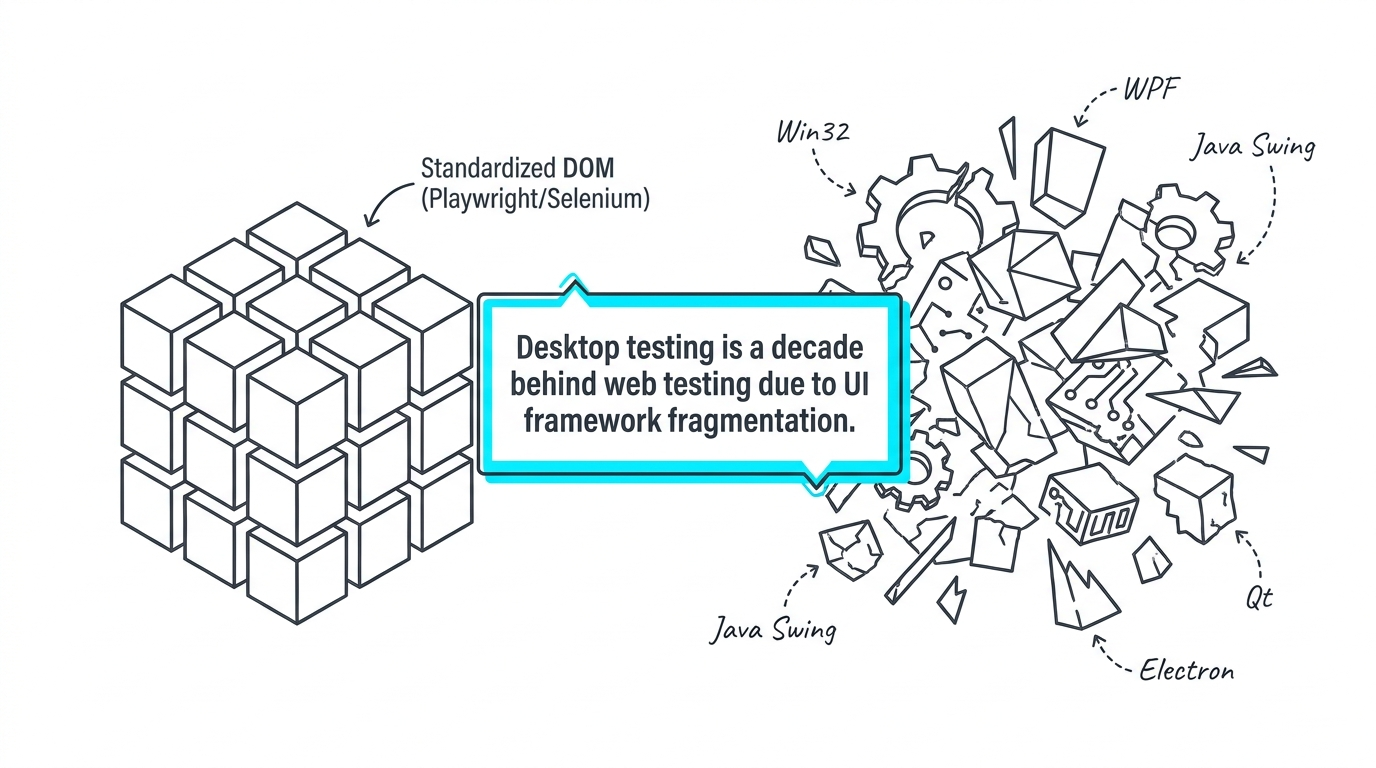
A Windows desktop estate may include native Win32 controls, WPF visual trees, Java Swing components, Qt widgets, Chromium-based Electron applications, DirectX-rendered surfaces, remote sessions, and bespoke enterprise controls. Each can expose a different automation surface—or none at all.
That fragmentation creates three recurring costs:
- Locator instability. A selector strategy that works for one framework does not generalize reliably to another.
- Tool specialization. Teams accumulate framework-specific drivers, adapters, and recovery logic.
- Maintenance asymmetry. A small UI refactor can break desktop tests in ways that would often be survivable with resilient web selectors.
The central engineering challenge is therefore not merely "how to click a button." It is how to resolve human intent into a stable target across heterogeneous UI technologies.
2. Three Automation Paradigms: API-Bound, Pixel-Bound, and Intent-Bound
Desktop automation approaches can be grouped into three broad families.
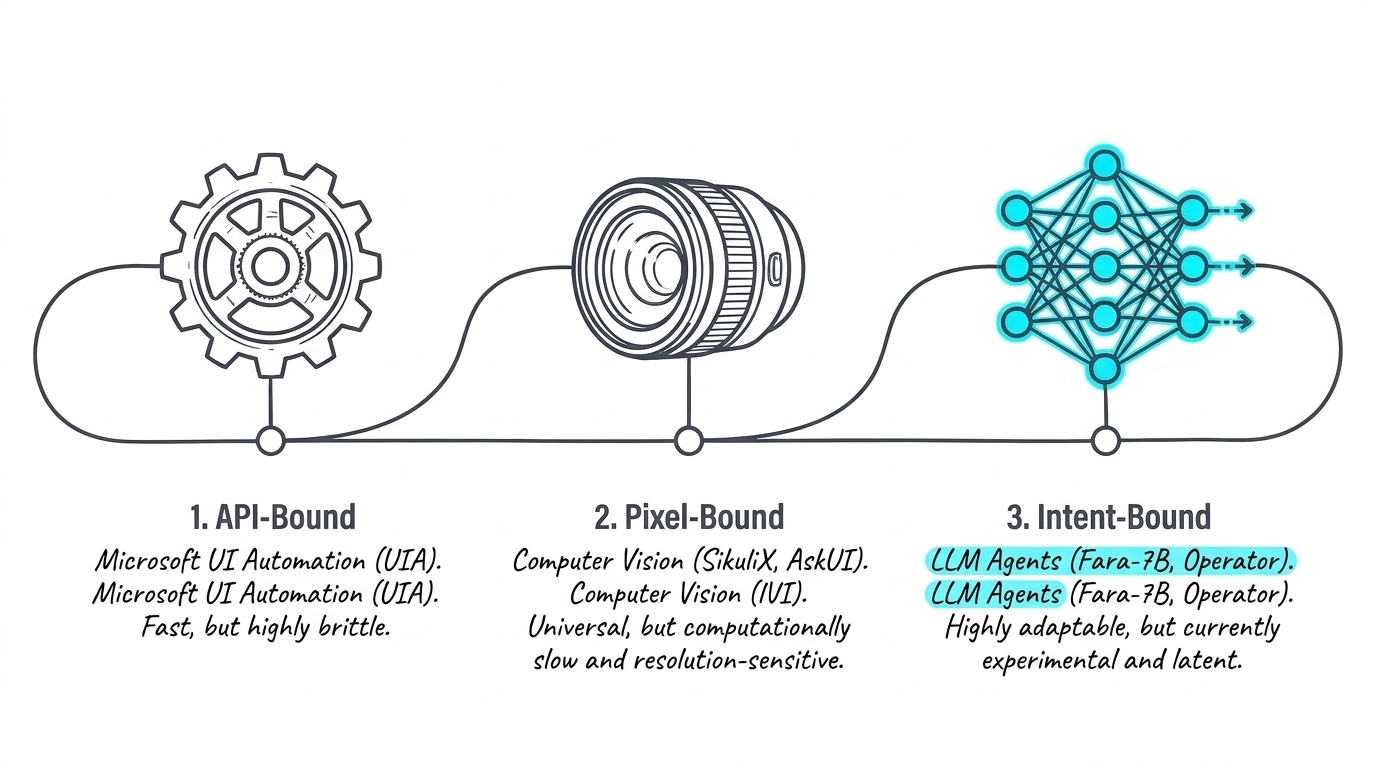
API-bound automation
Frameworks built on Microsoft UI Automation or similar accessibility APIs can be extremely fast because they interact with structured control trees rather than pixels. They are well suited to environments where controls expose stable names, roles, AutomationIds, hierarchy, and state.
The weakness is brittleness at the boundary. Custom controls, inaccessible legacy software, dynamic identifiers, or framework-specific rendering can cause the automation tree to become incomplete or misleading.
Pixel-bound automation
Computer-vision systems such as SikuliX-style workflows or visual desktop agents operate from screenshots. They can work even when no accessibility tree exists because the rendered interface itself becomes the source of truth.
The trade-off is computational cost and sensitivity to rendering conditions. Resolution, scaling, theme changes, animation, occlusion, and latency can all affect visual matching.
Intent-bound automation
Multimodal agents reason from goals such as "open the File menu and save the document" instead of relying on a pre-authored coordinate or selector. This makes them adaptable, especially during exploratory automation and test creation.
The weakness is determinism. A general-purpose agent may spend seconds on each perception-reasoning-action cycle and can make different decisions across runs. That is acceptable for exploration; it is much harder to tolerate in a regression pipeline.
The architectural implication is important: these paradigms should not compete for a single winner. They should be composed into a fallback hierarchy.
3. The Fast Path: Accessibility and UI Automation
When the accessibility layer is healthy, it should remain the first choice.
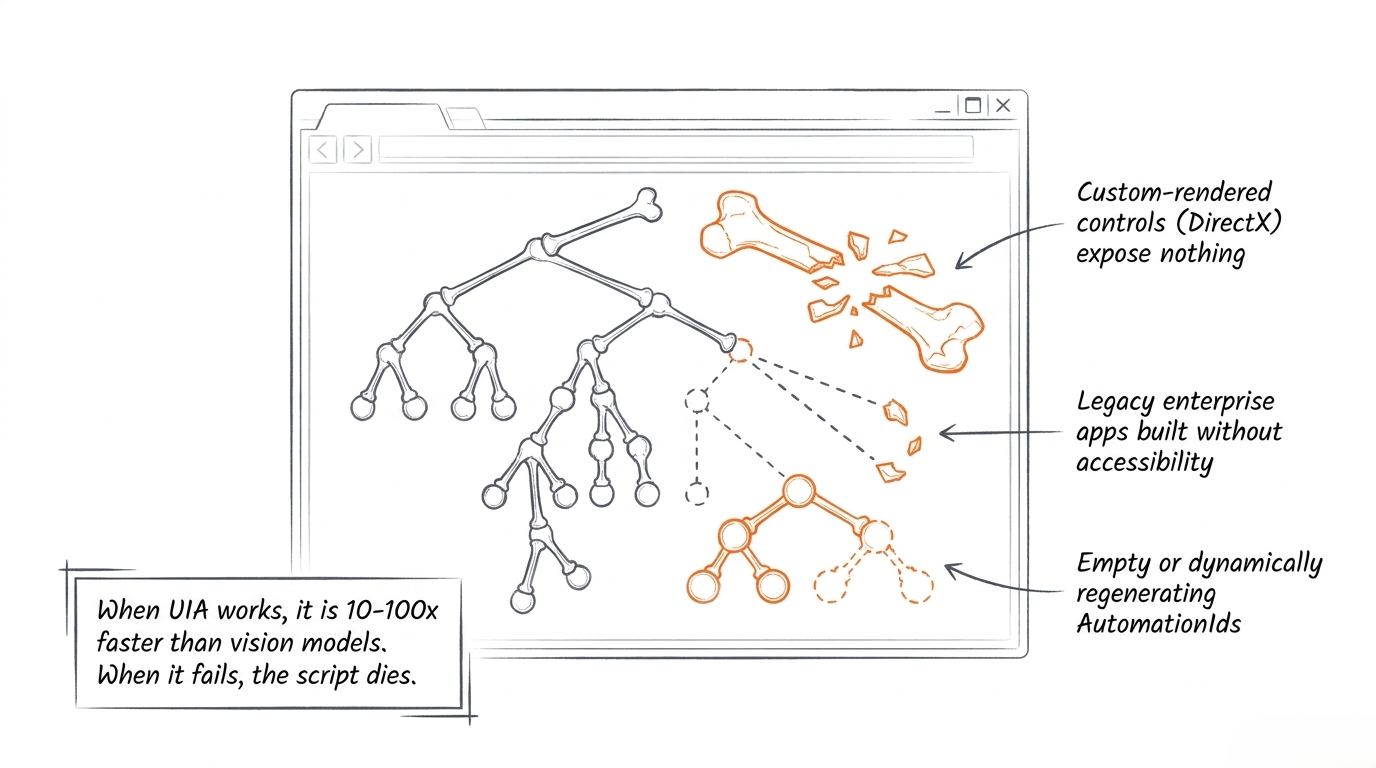
Structured UI automation can resolve a control once, interact through an operating-system API, and proceed without repeatedly interpreting a full screenshot. The source slide notes that this can be dramatically faster than vision-based interaction when it works. The exact performance ratio will vary by application and implementation, but the design principle is sound: do not invoke expensive visual reasoning for a target that can be resolved deterministically.
The difficulty is the failure surface:
- custom-rendered DirectX controls may expose nothing useful;
- older applications may have incomplete accessibility support;
- AutomationIds may be missing, unstable, or regenerated;
- virtualized trees can hide controls until they are rendered;
- framework wrappers can expose implementation details instead of user-meaningful semantics.
A production architecture therefore needs a recovery path that does not turn every locator failure into a test failure.
4. Why Pure Vision Agents Are Too Expensive for Every Step
A screenshot-driven agent commonly follows a loop: capture the current state, analyze it with a multimodal model, choose an action, execute through the OS, then repeat.
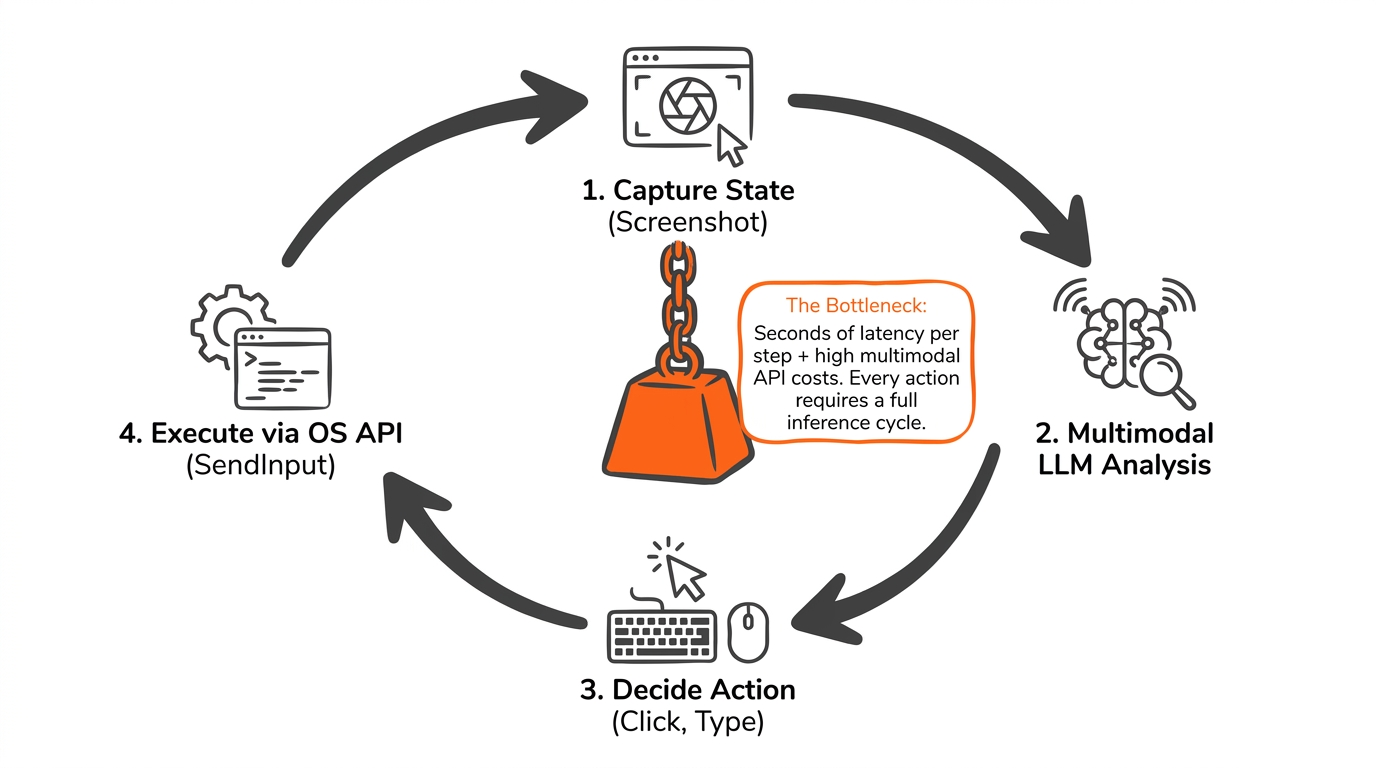
This loop is powerful because it can recover from unfamiliar layouts. It is also expensive because every action may require a new inference cycle. The result is a poor fit for large deterministic regression suites where thousands of steps must execute quickly and reproducibly.
The bottleneck is not just model latency. It includes:
- screenshot capture and encoding;
- multimodal token or image processing cost;
- reasoning latency;
- coordinate grounding;
- uncertainty handling;
- retries after ambiguous or incorrect actions.
The correct optimization is architectural: move AI out of the hot path whenever cheaper structure is available. Use a model to repair or disambiguate a target, then return to deterministic execution.
5. Agent Success Rates Are Not the Same as Regression Reliability
General-purpose computer-use benchmarks demonstrate rapid progress, but benchmark success is not equivalent to CI-grade reliability.
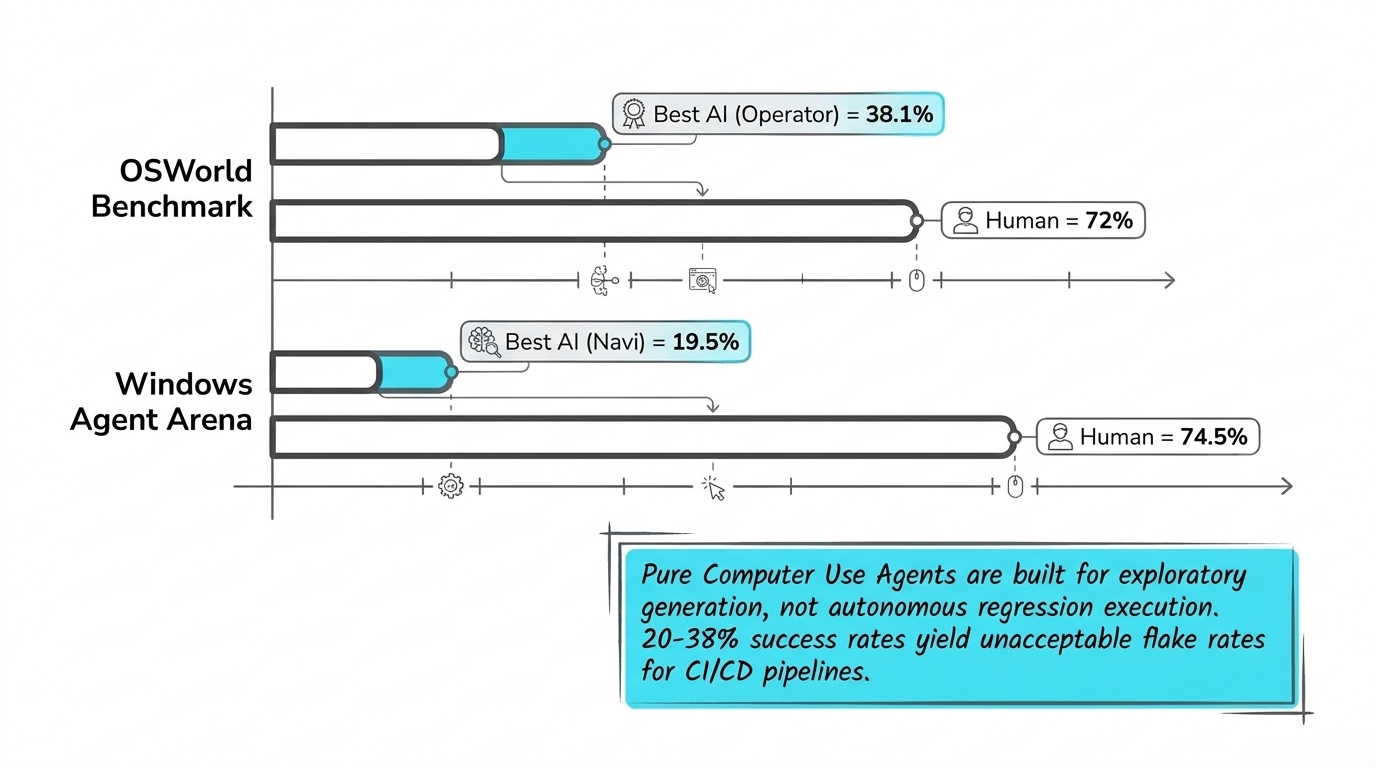
The source slide cites benchmark results for systems such as OSWorld and Windows Agent Arena and contrasts them with human performance. Those values should be read as contextual evidence from the presentation rather than independently verified measurements here.
The operational point is more important than any single percentage: a system that succeeds on a majority of heterogeneous tasks may still be unusable as an unattended regression engine.
If a regression suite contains hundreds of dependent actions, even a small per-step failure rate compounds quickly. That is why exploratory computer-use agents and production test runners have different requirements. Exploration benefits from flexibility. Regression demands bounded variance, reproducibility, clear failure evidence, and predictable recovery.
6. A Better Pattern: Put the Agent on the Machine
One promising pattern is to run a lightweight local agent beside the application under test while a cloud orchestrator handles planning, model access, policy, or higher-level coordination.
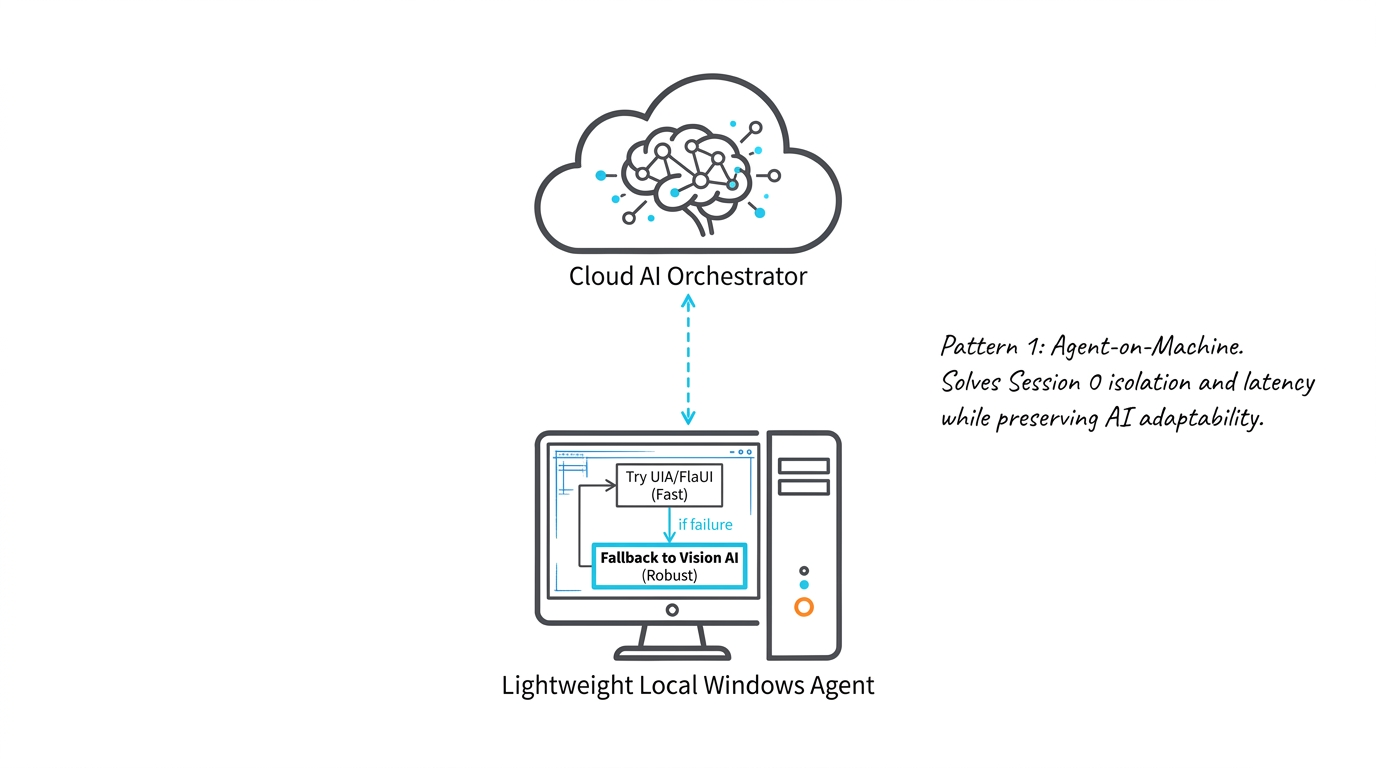
The local agent can attempt deterministic interaction first—for example, UI Automation or FlaUI—then fall back to a visual resolver only when the structured path fails.
This split has several benefits:
- Lower interaction latency. OS calls and accessibility-tree queries stay local.
- Session correctness. The agent executes inside the same Windows session as the application.
- Reduced data movement. Not every action requires a full screenshot round trip.
- Clear fallback boundaries. The system can distinguish deterministic success from AI-assisted recovery.
- Better observability. Each attempt can record which resolver was used and why escalation occurred.
The local component should remain small. Its job is not to become a second orchestration platform; it should expose a compact execution surface and a consistent observation model.
7. Locator Healing Should Be a Cascade, Not a Guess
Self-healing locators are often described too vaguely. A useful implementation is a layered resolution cascade.
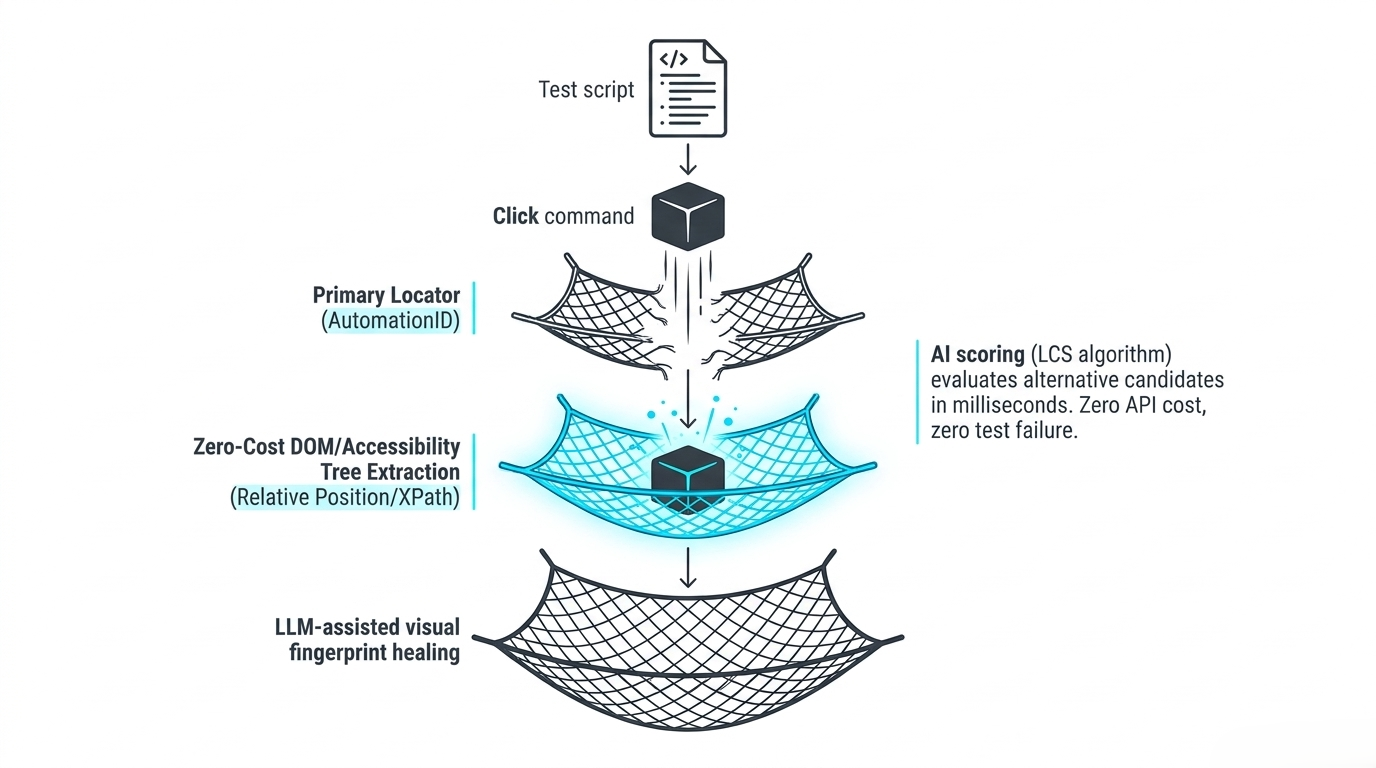
A click request can progress through increasingly expensive strategies:
- Primary locator. Use the authored AutomationId, role, name, or other stable selector.
- Structured fallback. Query the accessibility tree for relative position, parent-child relationships, labels, roles, or XPath-like relationships.
- Scored candidate selection. Rank alternative structured candidates using deterministic or lightweight similarity logic.
- Visual fingerprint healing. Invoke a visual or multimodal resolver only when structured evidence is insufficient.
This ordering matters. It prevents an LLM from becoming the default selector engine and keeps routine execution cheap.
A production healer should also preserve evidence: the original selector, the candidate set, the selected replacement, confidence, screenshot, and reason for escalation. Healing without evidence is difficult to audit and can silently turn a broken test into the wrong test.
8. Separate Semantic Reasoning from Spatial Grounding
One of the most useful design ideas in modern visual agents is to separate two questions:
- What does the user mean?
- Where is that thing on this screen?
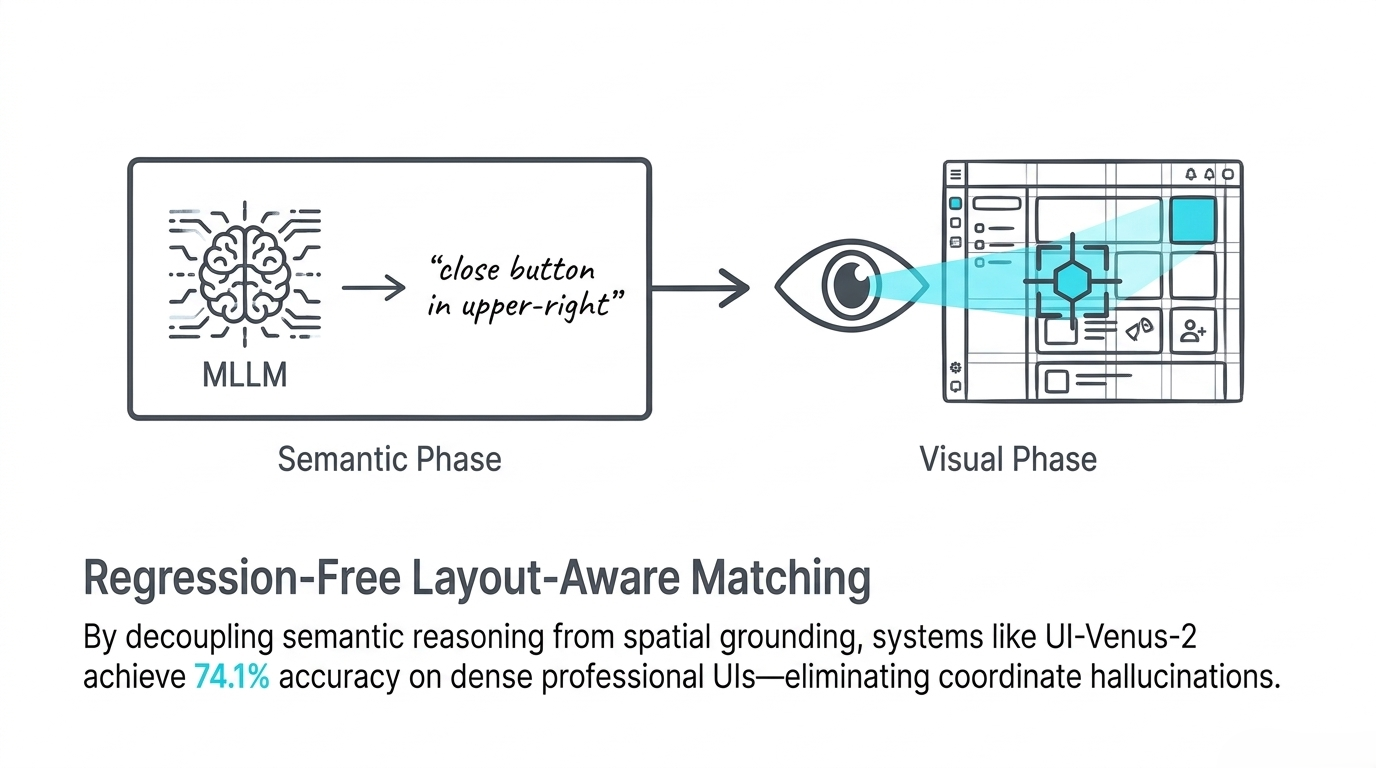
A multimodal language model can interpret "the close button in the upper-right" as a semantic description. A specialized visual stage can then locate the corresponding region without asking the language model to hallucinate a precise coordinate directly.
The source slide cites UI-Venus-2 and a 74.1% result on dense professional interfaces. Again, that number is best treated as a claim from the supplied material unless independently verified. The broader engineering lesson does not depend on the exact figure: decoupling semantic interpretation from spatial localization makes failures easier to diagnose and lets each stage use a model optimized for its task.
This also improves test portability. The semantic intent can stay stable even if the visual arrangement changes.
9. Represent Tests as Intent, Not Coordinates
The long-term abstraction should look closer to a semantic command than to a recorder trace.
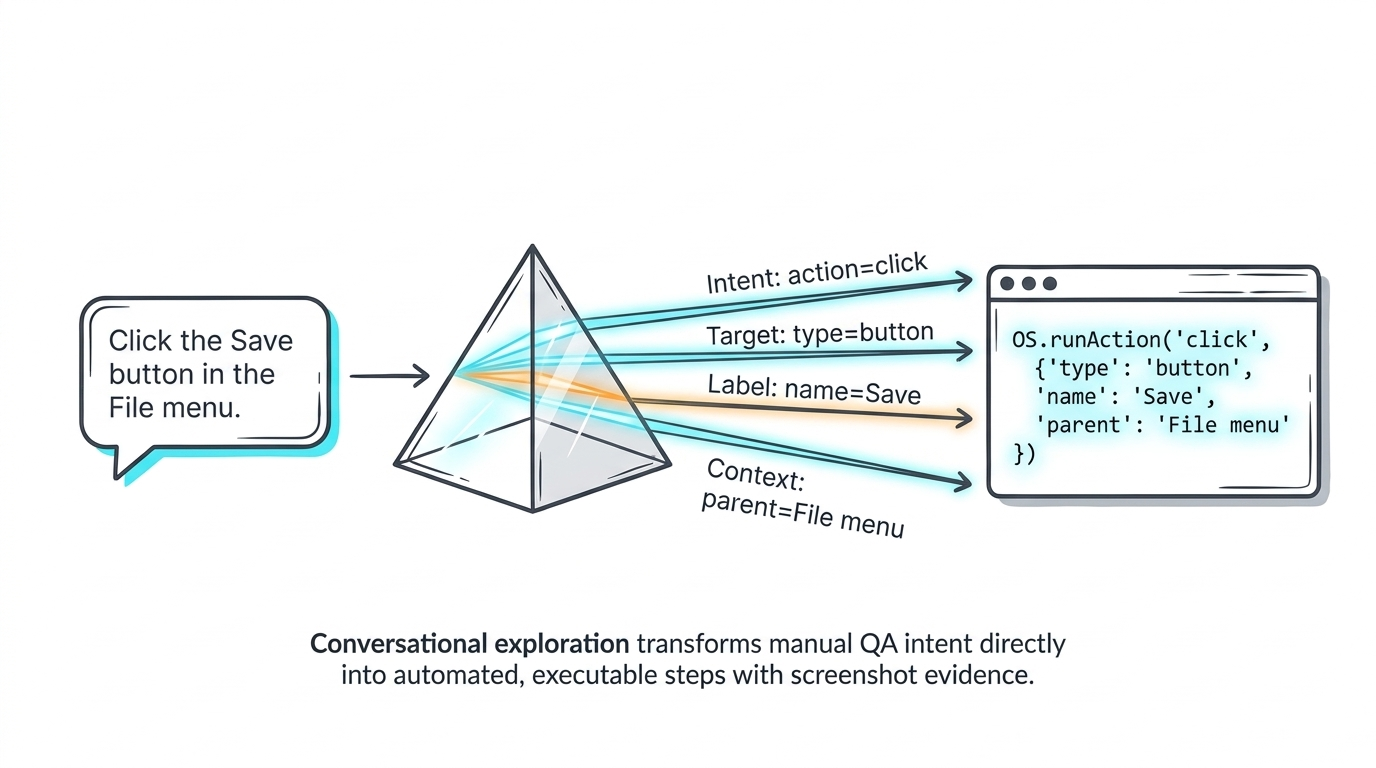
A request such as "Click the Save button in the File menu" can be normalized into an action contract:
- action:
click - target type:
button - label:
Save - context:
File menu
That structured intent can then be resolved using the current environment. If an AutomationId exists, use it. If the accessibility tree is incomplete, infer candidates from surrounding structure. If the control is visually rendered but inaccessible, ground it in the screenshot.
This is a more durable representation than an (x, y) coordinate because it captures why the action is being performed, not only where it happened during recording.
It also creates a natural bridge between conversational test authoring and executable automation. A human can describe a workflow; the system can turn it into structured actions while retaining screenshots and resolution evidence.
10. Security Must Validate Intent, Not Only Permissions
Traditional operating-system security answers questions such as "may this process access the network?" or "may this user write to this directory?" Agentic systems introduce a harder question: does this specific action make sense in the context of the user’s declared goal?
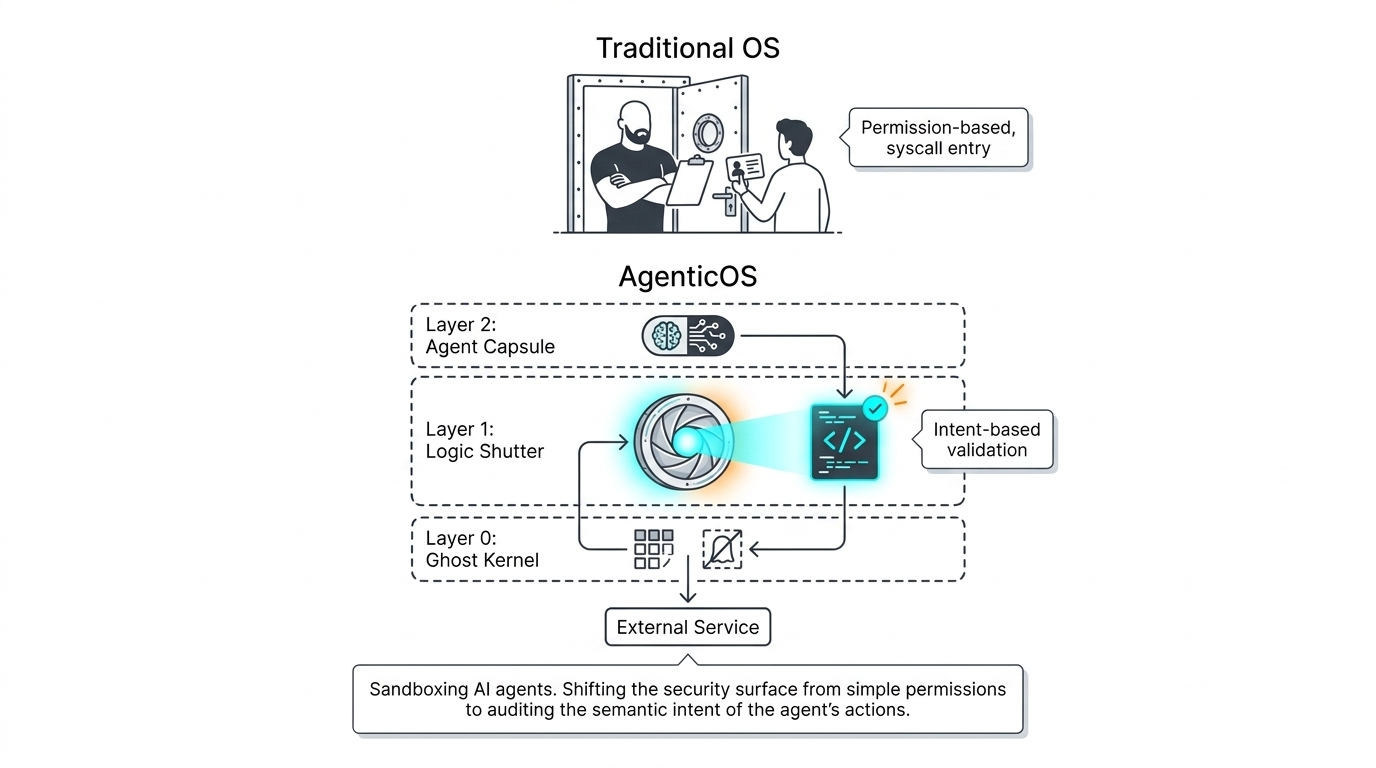
An agent with broad permission to interact with the desktop can still perform an unsafe or incorrect action. A stronger design inserts policy and validation between intent and execution.
The supplied architecture illustrates a layered model:
- a low-level execution or sandbox layer;
- a logic-validation layer that inspects intended actions;
- an agent layer that proposes or coordinates work;
- external services behind explicit boundaries.
For desktop testing, this can translate into concrete controls:
- restrict the agent to approved applications or windows;
- block destructive OS actions unless explicitly allowed;
- validate high-impact commands before execution;
- capture before/after evidence for sensitive steps;
- separate test data credentials from general desktop identity;
- audit semantic actions, not just raw mouse events.
As agents become more capable, intent becomes part of the security surface.
11. The Hybrid Architecture Wins on the Important Trade-offs
No single technique optimizes speed, reliability, dynamic-UI handling, and setup cost simultaneously.
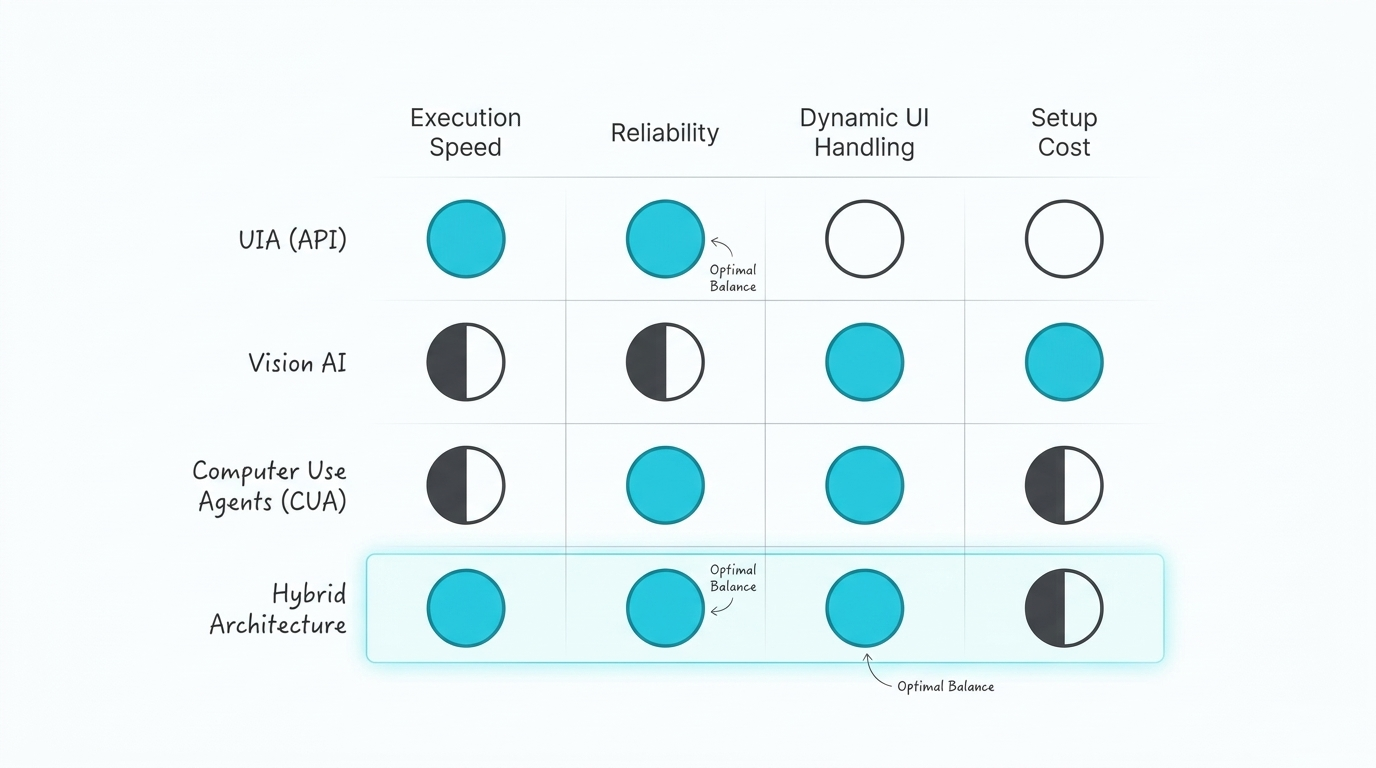
Traditional UI Automation is fast and reliable when the control tree is good, but weaker against highly dynamic or inaccessible UIs. Vision systems are more universal but slower. Computer-use agents adapt well, but can be expensive and variable. A hybrid architecture aims to keep the best properties of each.
A useful default policy is:
- API first for speed and determinism;
- structured healing second for resilience;
- vision third for inaccessible controls;
- agent reasoning last for ambiguity, recovery, or generation.
The order can change for specific environments, but the cost curve should remain explicit. Escalation should be observable and measurable rather than hidden inside a single black-box model call.
12. Tooling Should Follow the Application Estate
The correct automation stack depends on what the organization actually needs to test.
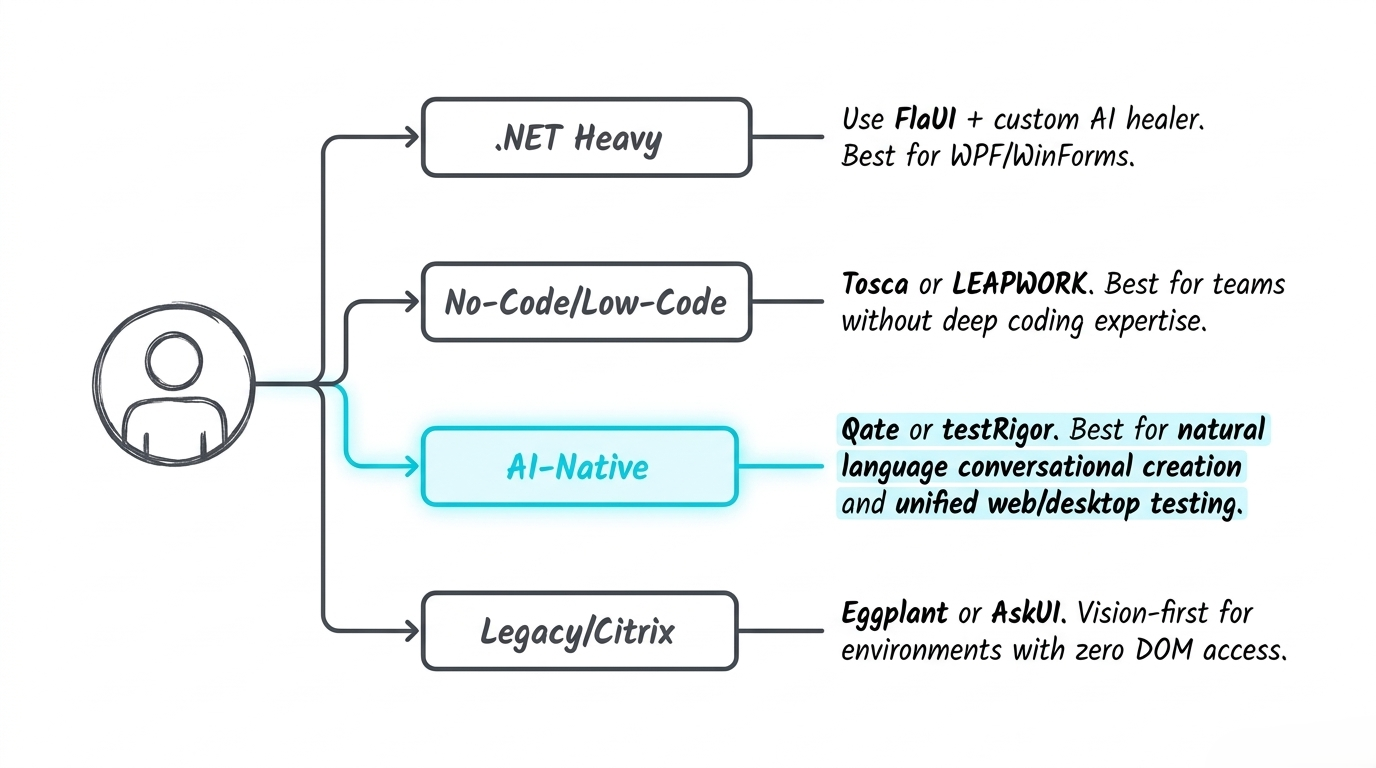
For .NET-heavy estates, a framework such as FlaUI can provide strong access to Windows automation APIs, with an AI-assisted healing layer added selectively. Teams that prioritize low-code workflows may prefer platforms such as Tosca or LEAPWORK. AI-native platforms can be attractive when conversational test creation and unified web/desktop workflows are more important. Legacy, Citrix, or inaccessible environments often push the architecture toward vision-first tools such as Eggplant- or AskUI-style approaches.
The key is not the product label. It is the capability profile:
- How much of the UI is structurally inspectable?
- How often do identifiers change?
- Do tests run in local sessions, VDI, RDP, Citrix, or cloud desktops?
- How much latency can the pipeline tolerate?
- Is conversational generation a priority, or is deterministic execution the main requirement?
- What evidence and governance must accompany every action?
A platform decision should be made against those questions, not against a generic "AI-powered" feature checklist.
13. MCP Can Become the Integration Contract
The final architectural step is to separate who generates intent from who knows how to execute it.
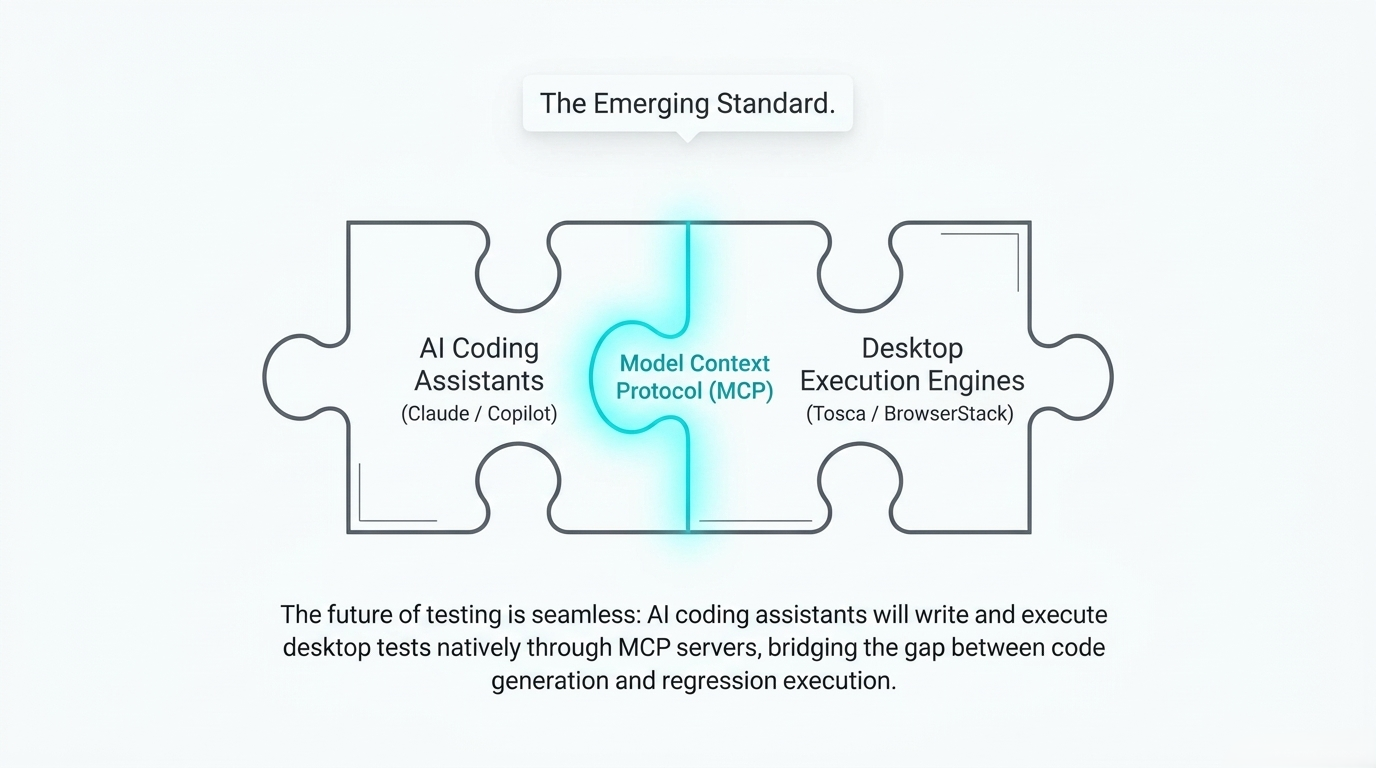
Model Context Protocol (MCP) provides a useful pattern for that separation. An AI coding assistant can express test intent through a tool contract, while an execution engine implements the platform-specific details behind the server boundary.
In practical terms, the stack can become:
AI coding assistant → MCP tool contract → desktop execution service → application under test
That service can hide the messy resolution cascade described earlier. A caller may request click(target={role: "button", name: "Save", context: "File menu"}); the local execution layer decides whether to use UIA, accessibility-tree relationships, visual grounding, or another fallback.
This division has several advantages:
- AI clients do not need to understand every desktop framework.
- Execution engines can evolve independently from the assistant.
- Organizations can place policy, telemetry, screenshots, and authorization at the MCP boundary.
- Multiple coding assistants can reuse the same enterprise execution capability.
- Test generation and regression execution can converge on a shared semantic action model.
MCP does not solve desktop automation by itself. It solves a different problem: how to expose desktop automation as a stable, tool-oriented capability to AI systems. That is what makes it strategically important.
Engineering Principles
A production-grade AI desktop testing architecture should follow a few durable principles:
-
Keep AI off the hot path by default.
Use deterministic APIs whenever a reliable structure exists. Escalate to vision or reasoning only when needed. -
Preserve semantic intent.
Store actions as meaning—role, label, context, expected state—not only as coordinates or opaque selectors. -
Make fallback explicit.
Resolution should be a visible cascade with measurable cost, confidence, and evidence at every stage. -
Separate perception, reasoning, and execution.
Distinct stages are easier to optimize, debug, secure, and replace than a single opaque agent loop. -
Treat governance as part of the runtime.
Agent actions require policy checks, audit trails, screenshots, and bounded permissions, especially in enterprise desktop environments. -
Design for heterogeneous estates.
A robust platform assumes some applications will expose excellent accessibility metadata and others will expose almost none. -
Standardize the tool boundary.
A protocol layer such as MCP can decouple AI clients from execution engines and provide a natural place for policy and observability.
Final Synthesis
The future of desktop test automation is unlikely to be a single universal AI model controlling the mouse. The stronger design is a layered execution system that uses the cheapest reliable signal first and escalates only when necessary.
The production-ready pattern combines:
- Deterministic foundation: OS and accessibility APIs for fast, reproducible interaction.
- Resilient locator layer: structured candidate search and self-healing before model invocation.
- Visual fallback: screenshot grounding for custom-rendered or inaccessible controls.
- Agent layer: semantic interpretation, recovery, and conversational test generation.
- Security and governance: intent validation, scoped permissions, audit evidence, and policy enforcement.
- Protocol boundary: MCP or a similar tool contract connecting assistants to execution engines.
- Observability: per-step traces showing which resolver executed, what evidence supported the action, and where fallback occurred.
The resulting system is not "AI instead of automation." It is AI used as a precision fallback and intent translator inside an automation architecture that remains deterministic whenever possible.
Closing Thought
Desktop testing becomes tractable when the architecture stops demanding one perfect locator technology for every application.
Standardize the intent, layer the resolution strategies, and make execution a governed tool.