
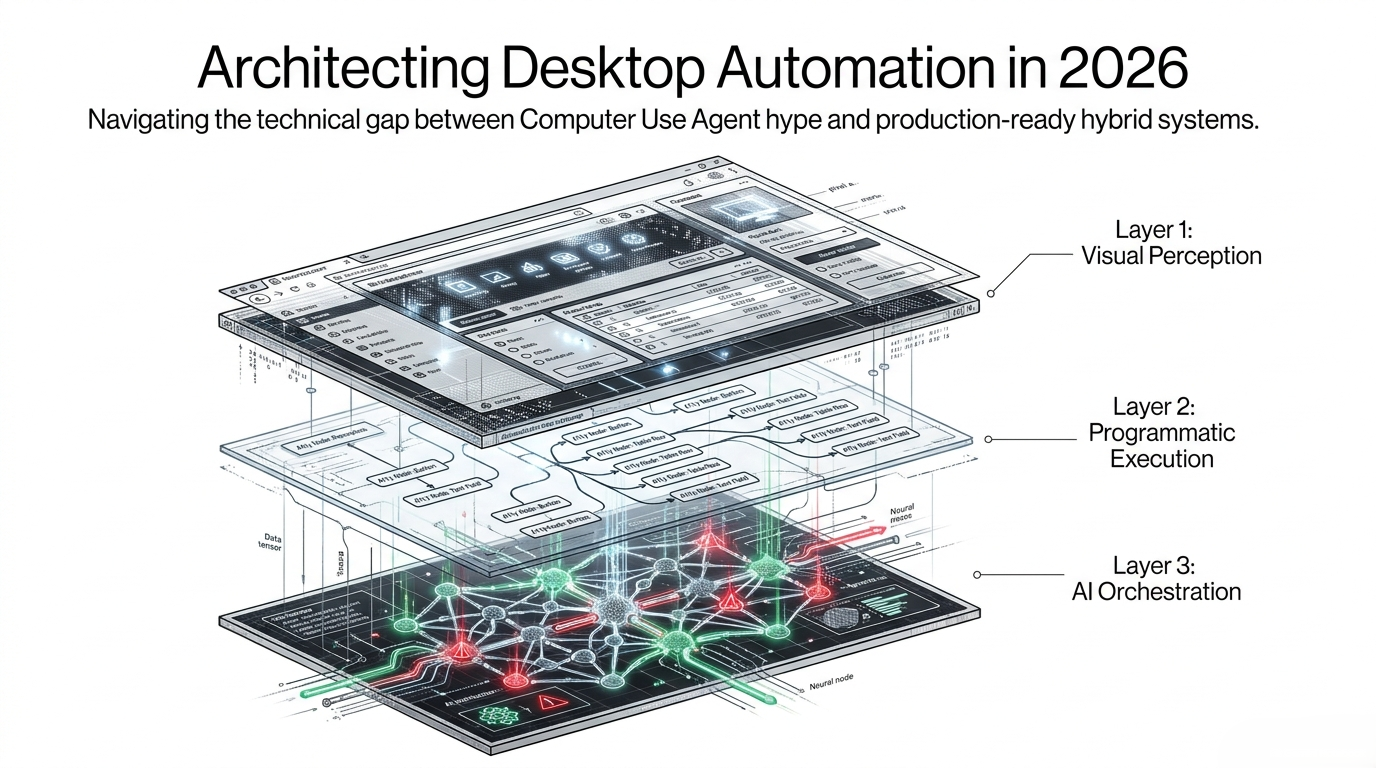
Architecting Desktop Automation in 2026: From Computer Use Hype to Production-Ready Hybrid Systems
Desktop automation is having its second AI moment. Multimodal models can now inspect screenshots, reason about what is visible, and issue mouse or keyboard actions. That capability is real. It is also easy to confuse with a production architecture.
The hard part is not making an agent click a button once. The hard part is making the same workflow execute repeatedly across Windows versions, application updates, remote sessions, custom controls, focus changes, security boundaries, and partial failures while still producing evidence that an enterprise test team can trust.
The most credible architecture in 2026 is therefore not "vision replaces automation." It is a hybrid stack with three distinct responsibilities:
- Visual perception for understanding what the screen contains when structured automation data is missing or incomplete.
- Programmatic execution for fast, deterministic interaction through UI Automation, application APIs, keyboard primitives, and native operating-system controls.
- AI orchestration for intent translation, planning, recovery, test generation, and self-healing.
The key design principle is simple: use the most deterministic interface available for every action, and reserve model-based perception for the gaps.
1. Why Desktop Automation Is Harder Than Browser Automation
The web benefits from a standardized execution substrate. Browsers expose the DOM, accessibility information, consistent event models, and mature automation protocols. Even when a front-end framework changes, the automation layer usually retains a structured representation of the page.
Desktop software is different because "Windows application" is not one technology.
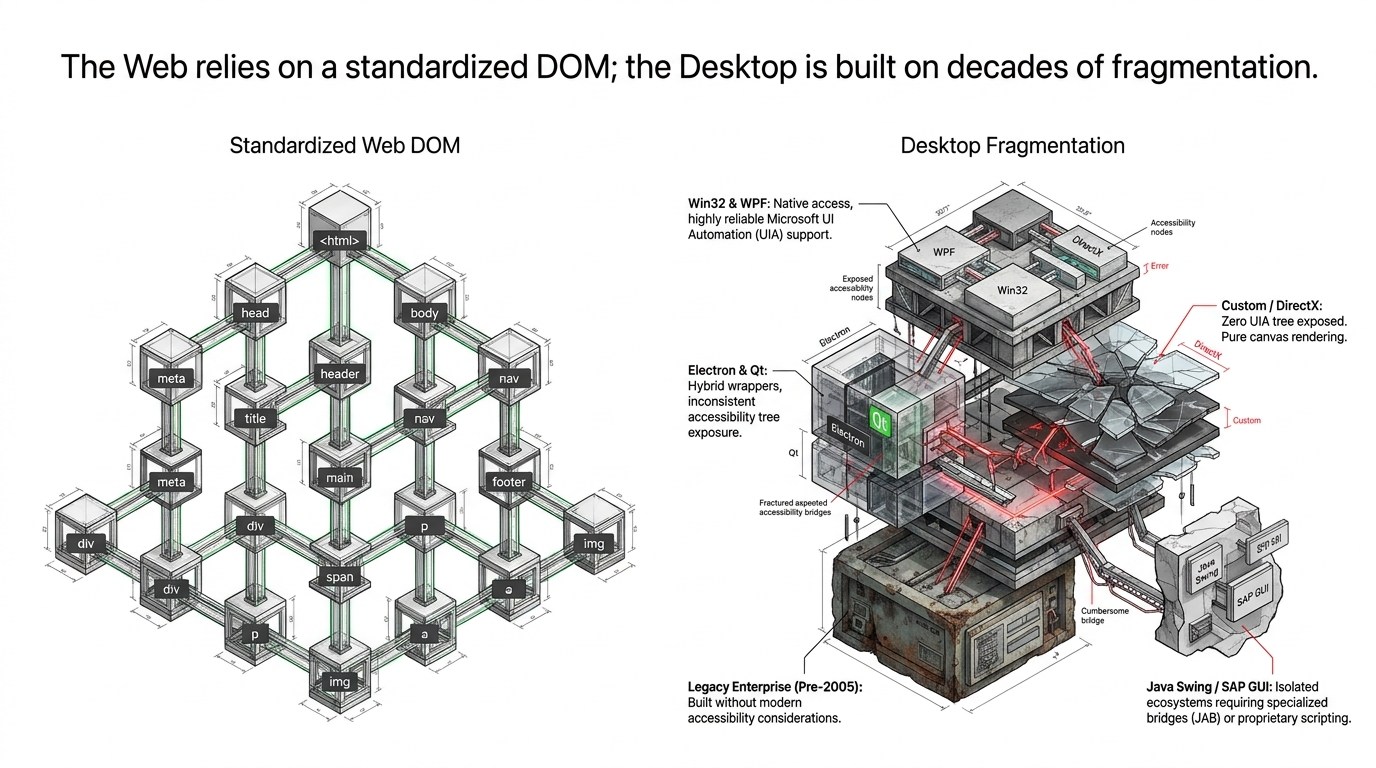
A single enterprise workflow may cross:
- Win32 and WPF applications with strong Microsoft UI Automation support.
- WinForms or newer native frameworks with varying accessibility quality.
- Electron or Qt applications where wrapper behavior can expose only part of the control tree.
- Java Swing and SAP GUI environments that may require dedicated bridges or product-specific scripting.
- Canvas, DirectX, remote desktop, Citrix, and custom-rendered interfaces that expose little or no useful semantic structure.
- Legacy applications created before accessibility and automation metadata were treated as first-class engineering requirements.
This fragmentation changes the architecture. A browser automation stack can often start with selectors and add visual fallback later. A desktop stack should assume from the beginning that no single locator mechanism will cover the entire estate.
That is why a production design needs multiple observation and action channels, plus explicit policy for choosing between them.
2. UI Automation Should Be the Primary Path - Not the Only Path
Microsoft UI Automation (UIA) remains one of the most important foundations for Windows test automation. It can expose properties such as AutomationId, Name, ClassName, control type, patterns, and bounding rectangles. When the application provides a healthy automation tree, UIA is usually much faster and more repeatable than screenshot reasoning.
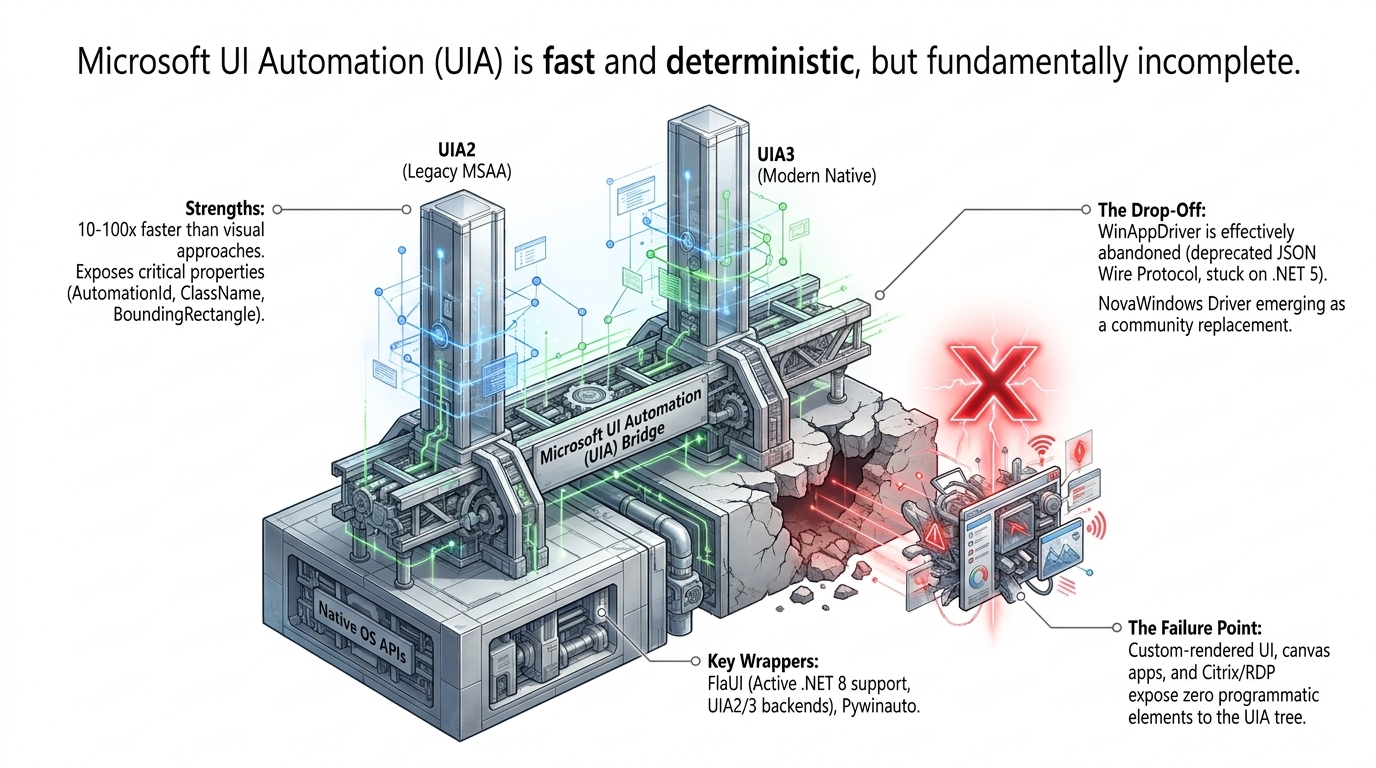
Frameworks such as FlaUI and pywinauto make UIA practical from .NET and Python. This path is attractive because it supports semantic targeting: "find the Save button inside the active dialog" is fundamentally more stable than "click pixel 1264,742."
But UIA is incomplete by design because it can only automate what the application exposes. Custom-rendered controls, embedded canvases, poorly implemented accessibility trees, and remote sessions can make the UIA tree sparse or useless.
There is also a tooling lifecycle issue. WinAppDriver was an important Selenium-style bridge for Windows automation, but its public release line remains anchored around legacy artifacts, including a v1.3 release candidate based on .NET 5. It can still be useful in pinned environments, but it should not be treated as the only strategic foundation for a new 2026 architecture.
A better rule is:
- Try UIA or an application-native API first.
- Verify that the expected element is actually actionable.
- Fall back to vision or model-based grounding only when the structured path is unavailable or ambiguous.
This keeps the common path fast while preserving compatibility with the ugly parts of the desktop estate.
3. The Screenshot-Action Loop Is Powerful, but Expensive and Stateful
Computer-use agents bypass the automation tree by repeatedly observing the screen, reasoning about the next action, executing it, and capturing a new screenshot.
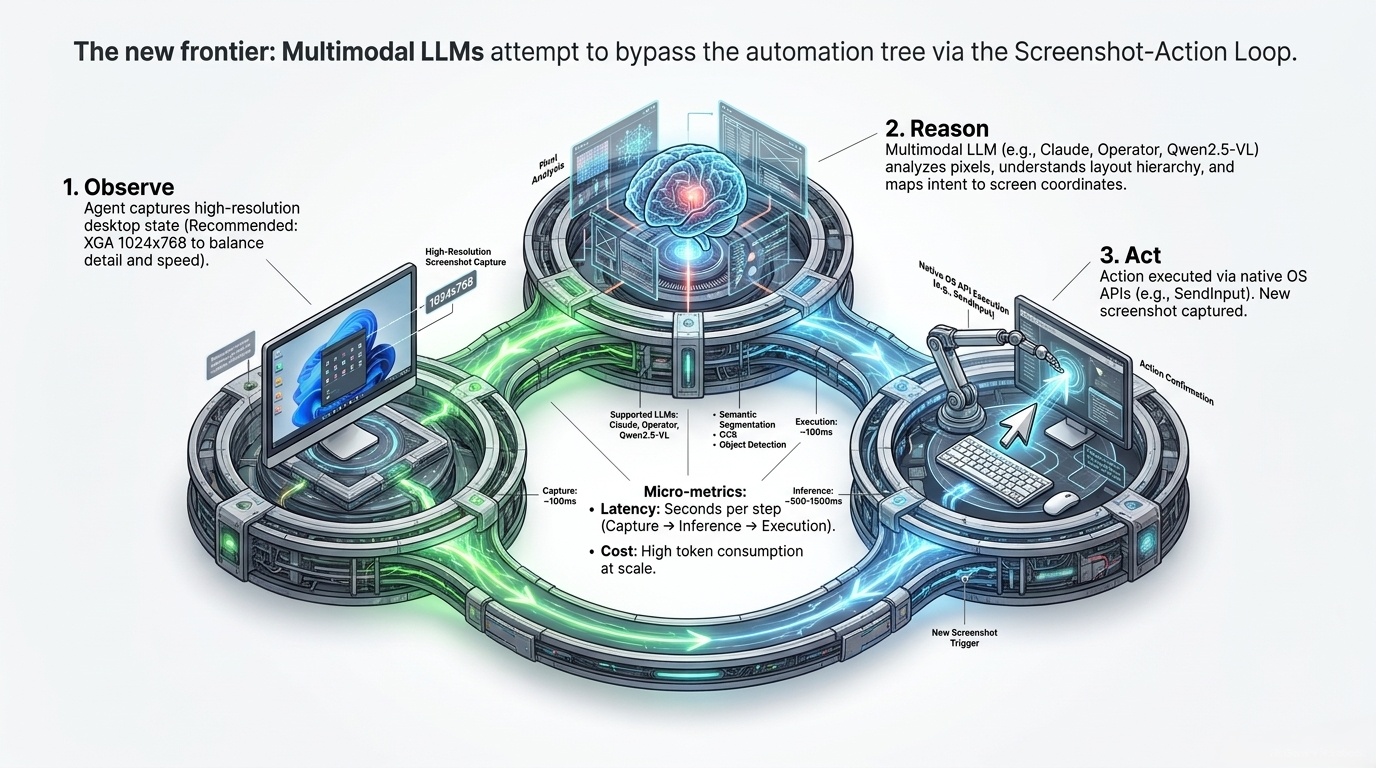
Conceptually the loop is straightforward:
- Observe. Capture the current desktop, active window, or target region.
- Reason. Infer layout, target semantics, current state, and the next action.
- Act. Execute a click, drag, keystroke, text entry, or operating-system command.
- Verify. Capture the resulting state and decide whether the intended transition occurred.
This architecture can operate on software that has no usable accessibility tree, which is the main reason it matters. But each cycle introduces latency, inference cost, and another opportunity for state drift.
The screenshot loop also carries more context than a structured selector. A UIA query may return a few relevant nodes. A screenshot may contain every toolbar, icon, text label, notification, background window, and rendering artifact on the screen. The model has to infer which information matters and which does not.
For exploratory testing, this flexibility is excellent. For high-volume regression, it becomes expensive unless the system can convert successful visual interactions into deterministic actions or reusable locators.
4. Coordinate Prediction Is Not Grounding
A central failure mode in vision-only automation is treating a coordinate as if it were an identity.
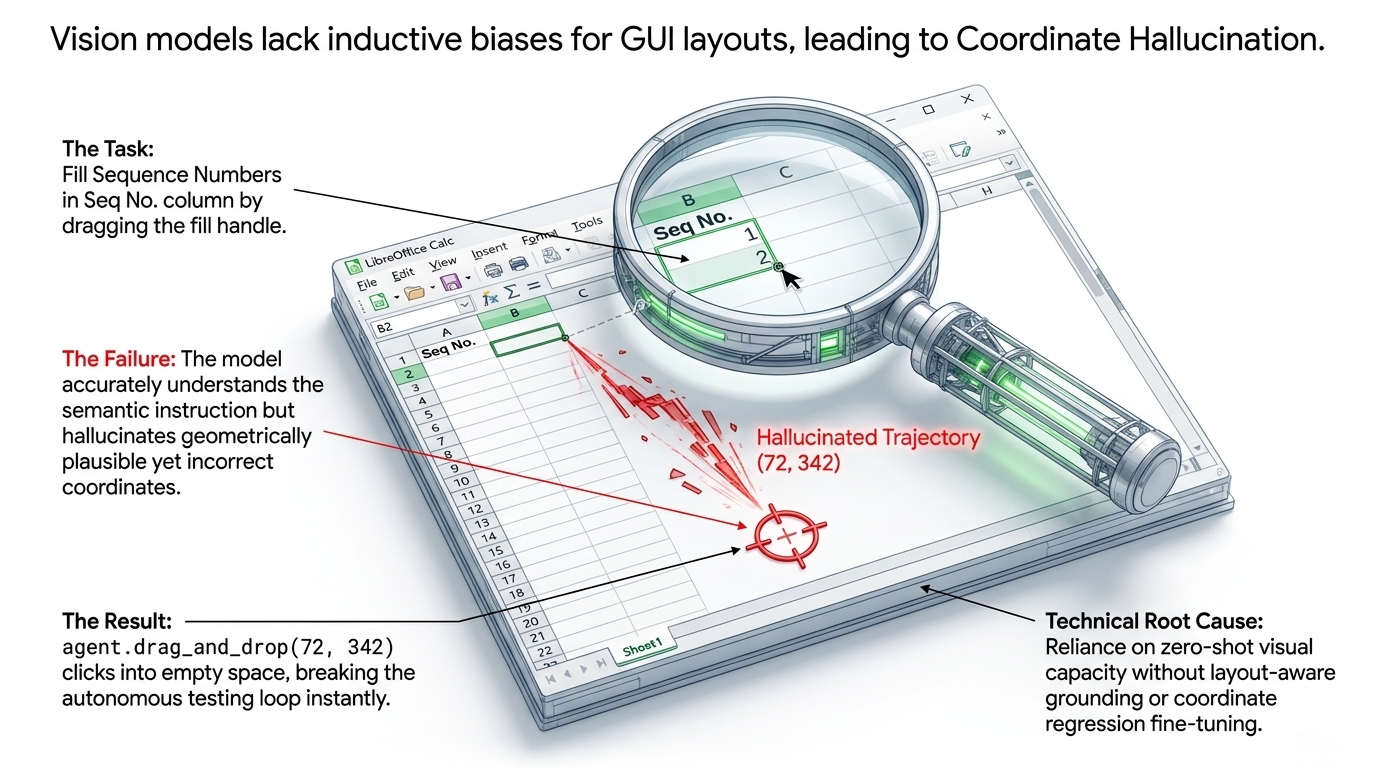
Suppose the task is semantically correct: "drag the spreadsheet fill handle downward." A model may understand the instruction, recognize the selected cell, and still generate a plausible but wrong endpoint. That can happen because raw screen geometry is unstable across:
- window placement,
- display scaling,
- DPI changes,
- zoom levels,
- ribbon state,
- font metrics,
- application updates,
- remote-desktop scaling,
- and transient overlays.
The mistake is architectural: the system predicted where to act without first proving what the target is.
Production grounding should therefore separate target identification from action geometry. The system should first identify an element or region using semantics, visual features, OCR text, accessibility metadata, or multiple signals together. Only then should it derive the coordinate needed for the physical action.
This does not make hallucination impossible. It changes the failure mode from unconstrained guessing to evidence-based selection.
5. Window Focus Is a First-Class Automation State
Cross-application workflows introduce another failure mode that is easy to underestimate: focus.
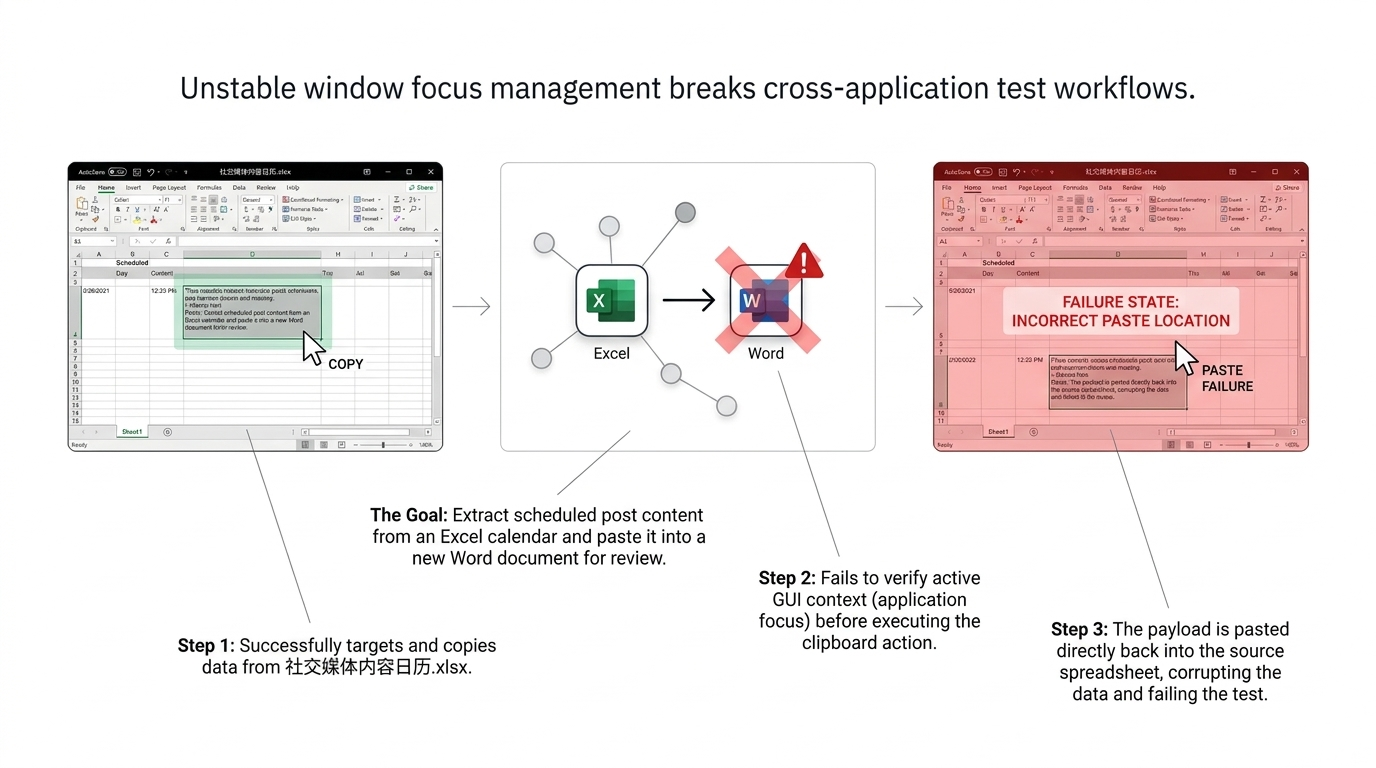
Consider a test that copies text from a spreadsheet and pastes it into a new word-processing document. The clipboard operation itself can succeed while the workflow still fails because the target window is not active. The paste then lands back in the source application.
A robust local agent should not model focus as an incidental side effect of clicking. It should track it explicitly.
Before a destructive or state-changing action, the executor should verify at least:
- the active process,
- the top-level window identity,
- the expected dialog or document,
- foreground status,
- and, where possible, the intended focused control.
For multi-app workflows, every transition should have a precondition and a postcondition. "Paste into Word" should become something closer to: "activate the expected Word document, verify its identity, focus the target insertion point, paste, then confirm that the text appeared in Word and did not alter the source spreadsheet."
This style of explicit state verification is less glamorous than visual reasoning, but it is what converts a demo into a test system.
6. Benchmark Progress Has Changed the Story - but Not the Production Requirement
The benchmark figures in the original slide deck capture an important historical moment, but they should not be presented as the current 2026 ceiling.
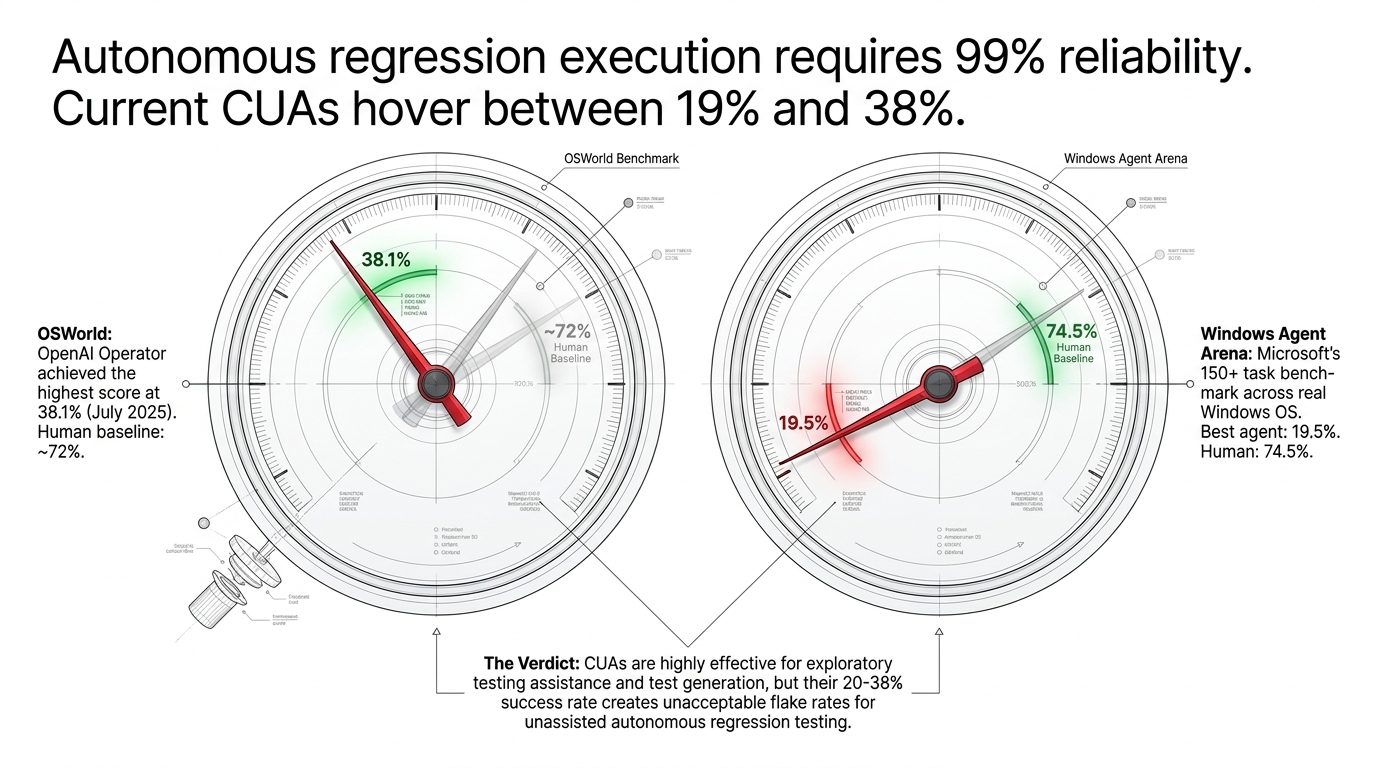
In early 2025, OpenAI reported 38.1% on OSWorld for its computer-using agent, compared with a 72.4% human baseline. Windows Agent Arena reported a best agent result of 19.5% versus 74.5% for humans on its Windows-focused benchmark. Those numbers justified strong skepticism about unattended computer use at the time.
By 2026, the benchmark landscape had moved quickly. The official OSWorld-Verified leaderboard listed results above 80%, including an 86.0% score in August 2026. OSWorld 2.0 was also introduced in June 2026 to evaluate longer-horizon workflows and make the benchmark more representative of difficult real work.
So the claim "current CUAs hover between 19% and 38%" is now outdated.
However, better benchmark scores do not remove the production architecture problem. Benchmark success rate and regression reliability are different quantities. Enterprise test execution needs repeatability under version drift, recoverability after partial failure, bounded side effects, observability, and consistent behavior across thousands of repeated runs.
Reliability also compounds across steps. If a 100-step workflow had an independent 99% success probability at each step, the probability of a completely successful run would be only about 36.6%. To achieve roughly 99% end-to-end success across 100 independent steps, the average per-step success rate would need to be about 99.99%.
That is why "99% reliable" must be defined at the scenario level, not used as a vague property of an agent.
The benchmark lesson for 2026 is therefore more nuanced: computer-use models have become dramatically more capable, but production regression still benefits from deterministic execution wherever deterministic interfaces exist.
7. Ground with Features and Semantics Before Predicting Coordinates
A stronger visual fallback architecture treats natural-language intent as a retrieval problem rather than a coordinate-regression problem.
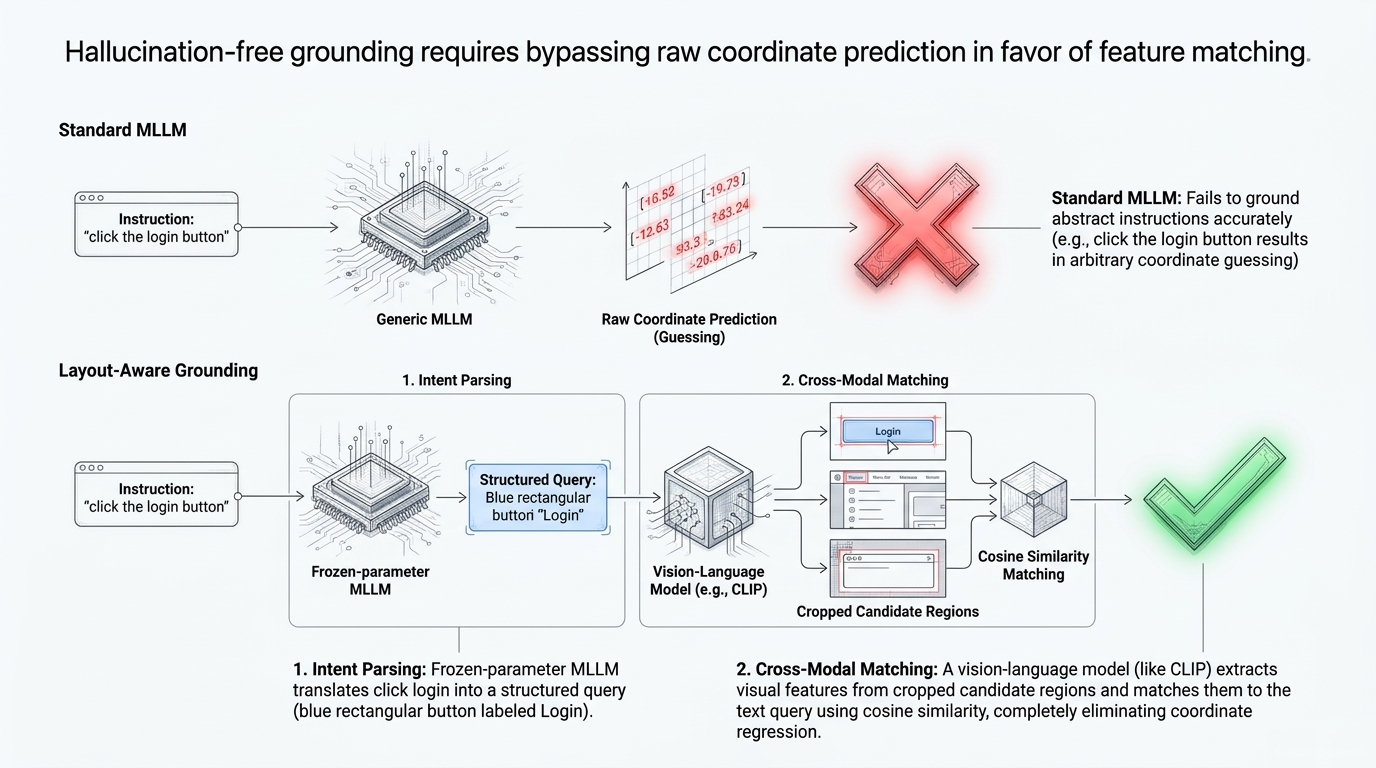
For an instruction such as "click the login button," the orchestrator can first create a structured target description:
role: button
text: Login
shape: rectangular
context: authentication form
The local agent can then generate candidate regions using UIA nodes, OCR boxes, icon detection, segmentation, or region proposals. A vision-language encoder can score each candidate against the structured query. Only after a candidate crosses a confidence threshold does the agent convert that region into a click point.
The exact implementation can vary. CLIP-style embeddings, OCR-plus-template matching, learned grounding models, or multimodal rerankers can all be used. What matters is the separation of concerns:
- Intent parsing determines what the test means.
- Candidate generation constrains where the answer can be.
- Cross-modal matching scores plausible targets.
- Action geometry is derived only after identification.
- Verification confirms that the state transition happened.
This does not create literally "hallucination-free" automation. It reduces unconstrained coordinate guessing and gives the system a confidence value that can drive fallback or escalation.
8. The Production Pattern: Cloud Brain, Local Muscle
The most useful deployment boundary is often between planning and execution.
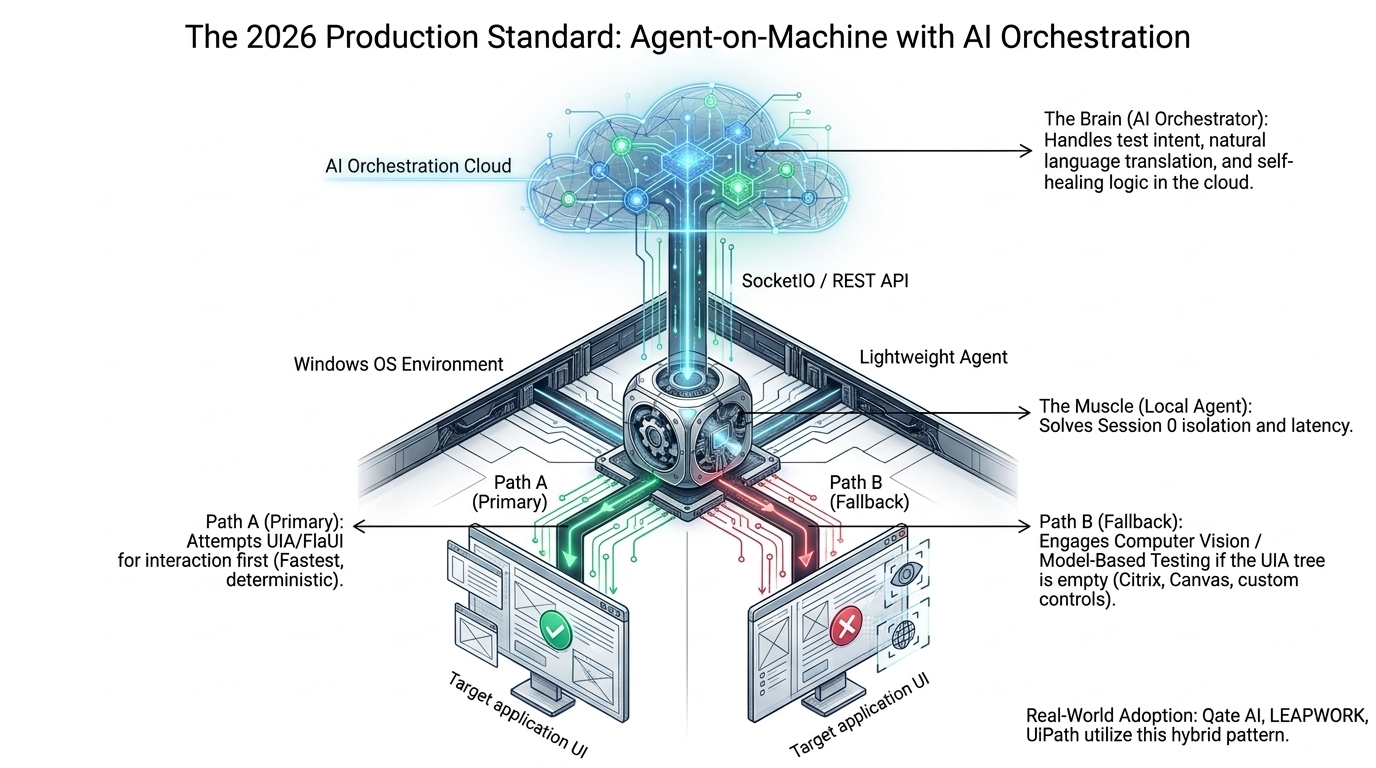
A cloud or centrally hosted orchestrator can handle:
- natural-language test intent,
- test-plan generation,
- policy decisions,
- recovery strategies,
- locator healing,
- result summarization,
- and fleet-level coordination.
A lightweight agent on the Windows machine should handle:
- process and window discovery,
- UIA interaction,
- screenshots and region capture,
- keyboard and pointer input,
- clipboard operations,
- local file and application state,
- focus verification,
- and low-latency retries.
The execution policy should have two main paths:
Path A: structured execution. Use UIA, FlaUI, application APIs, scripting bridges, or other semantic interfaces. This is the default because it is faster and easier to validate.
Path B: visual fallback. Use OCR, feature matching, or multimodal grounding when the application exposes no reliable structure, as can happen with Citrix, RDP, canvas, DirectX, or custom controls.
The local agent should run in the actual interactive user session that owns the desktop. It should not assume that a service running in Windows Session 0 can interact reliably with the user session. Session ownership, desktop identity, and elevation boundaries all need to be explicit.
The cloud brain decides what should happen. The local muscle proves where it is happening, performs the action, and returns evidence.
9. Self-Healing Should Be Multi-Attribute, Scored, and Reversible
Desktop UIs drift. A button can keep the same meaning while its AutomationId, class, label, location, or visual styling changes. A single exact locator is therefore brittle.
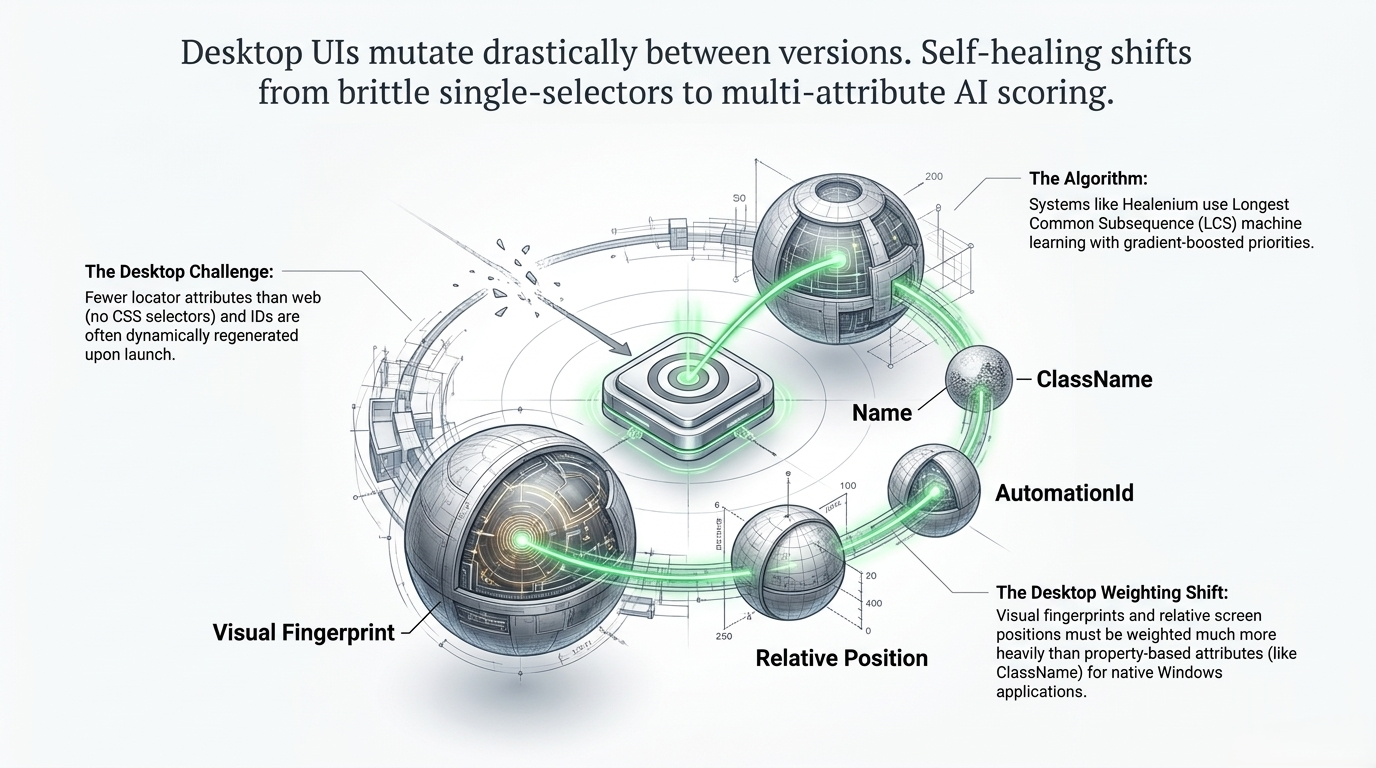
A practical self-healing system should preserve several kinds of evidence for each target:
AutomationId- control name or accessible label
- control type and class
- parent and sibling relationships
- relative position inside a stable container
- nearby text anchors
- visual fingerprint or embedding
- historical screenshots
- expected action pattern
At runtime, the agent can score new candidates against the stored signature. A weighted scorer might use exact matches for highly reliable attributes and softer similarity for unstable ones. The weights should depend on the application class: AutomationId may dominate in a well-built WPF application, while visual and relative-position features may matter more in a custom-rendered interface.
The most important production rule is that healing should be observable and reversible. If a locator changes, the system should record:
- the old locator,
- the new candidate,
- the evidence used,
- the confidence score,
- the screenshot before and after,
- and whether the change was automatically accepted or required approval.
Self-healing without an audit trail can silently transform a test into a different test.
10. MCP Is Becoming the Control Plane Between Coding Agents and Test Systems
Model Context Protocol (MCP) is increasingly relevant because it standardizes how an AI client discovers and invokes external tools.
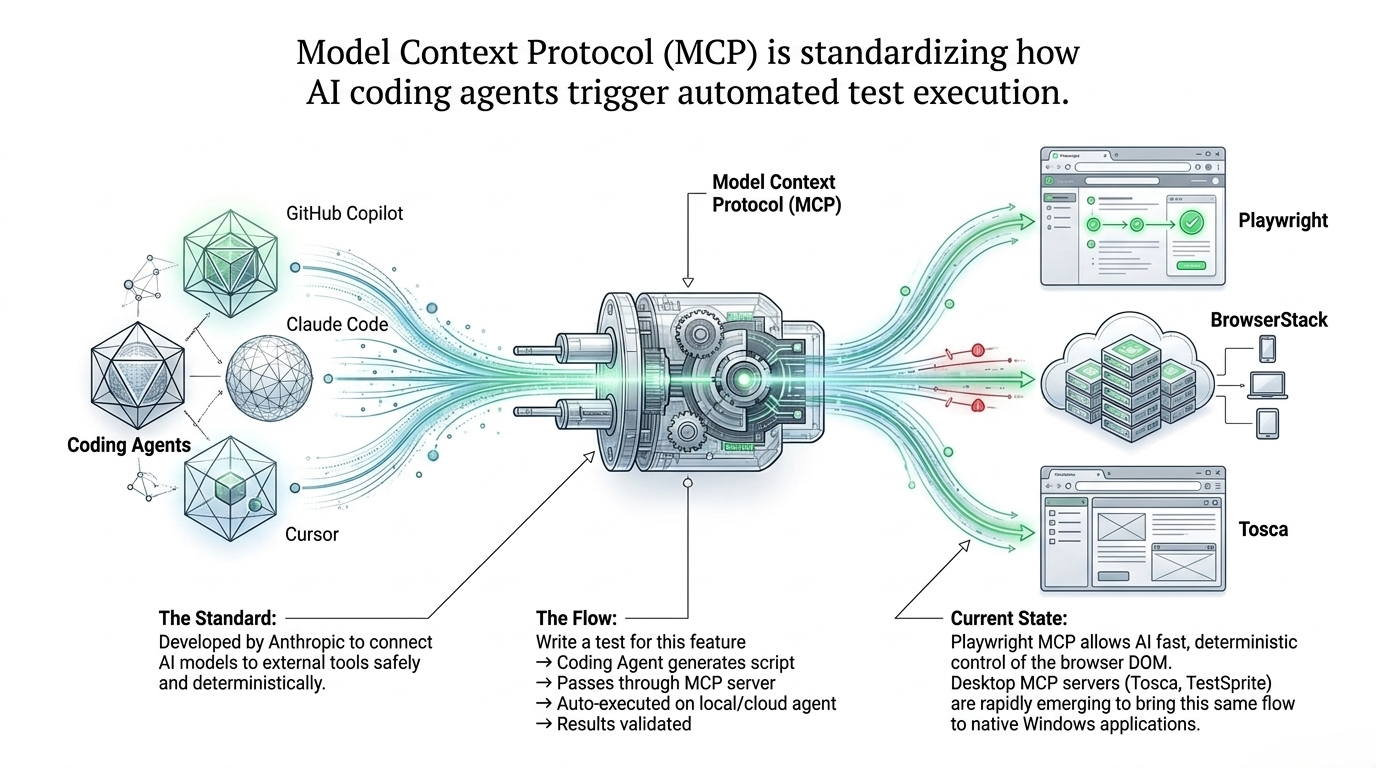
The web side is already concrete. Playwright provides an MCP server that lets compatible AI clients drive browser automation through structured accessibility snapshots. Tricentis Tosca added MCP integration that lets AI assistants access a Tosca workspace and create, organize, use, and run test assets.
For desktop automation, the same pattern is now emerging: expose deterministic Windows capabilities - inspect UIA, activate a window, click a named control, run a saved scenario, capture evidence - as typed tools behind an MCP server.
This is a better interface for coding agents than asking the model to synthesize low-level mouse coordinates directly. It also separates responsibilities cleanly:
Coding agent
   -> MCP tool call
      -> desktop automation service
         -> local Windows agent
            -> UIA / native API / visual fallback
               -> verification evidence
MCP should not be confused with an automation engine. It is a protocol boundary. The reliability still comes from the execution service behind the tool.
That distinction matters because it allows an organization to change models, IDEs, or orchestrators without rewriting every desktop automation primitive.
11. Security, Governance, and Observability Are Part of the Architecture
A desktop agent can click real buttons in real signed-in applications. That makes it materially different from a pure test-generation assistant.
A production deployment should include controls such as:
- least-privilege service and user identities,
- explicit allowlists for applications, windows, file paths, and actions,
- secure secret retrieval rather than embedding credentials in prompts,
- screenshot redaction or data-handling policy for sensitive applications,
- signed and versioned local agents,
- authenticated and encrypted orchestrator-to-agent communication,
- step-level audit logs,
- policy gates for destructive actions,
- deterministic replay artifacts,
- and automatic capture of screenshots, logs, active-window identity, and locator evidence on failure.
Observability should answer more than "the test failed." It should show whether the failure came from perception, grounding, focus, execution, application state, timing, policy, or verification.
Without that classification, AI recovery becomes guesswork and debugging becomes expensive.
12. Choosing a Strategy in 2026
There is no single desktop automation stack that is best for every organization. The correct choice depends on the application estate and the failure modes you actually have.
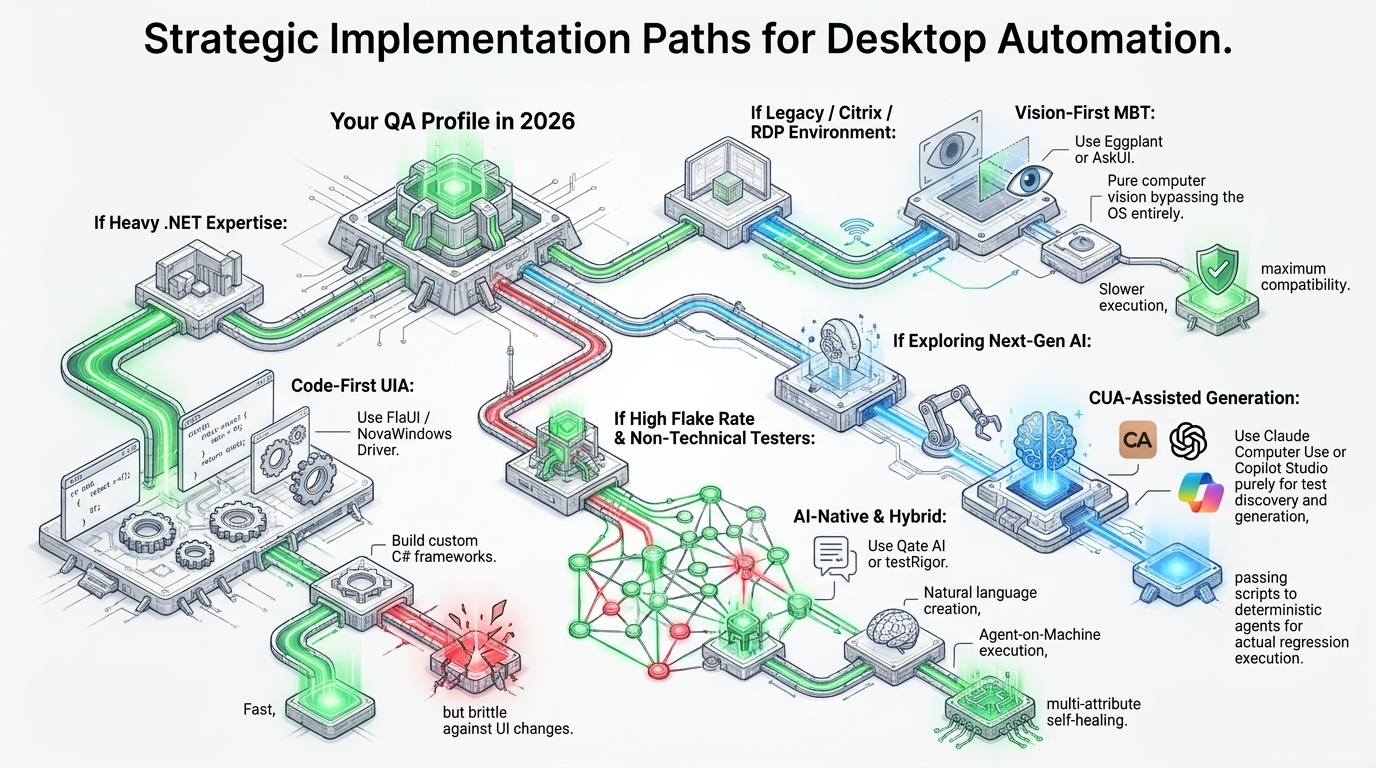
A practical decision framework is:
Heavy .NET enterprise estate
Use a code-first UIA strategy with FlaUI or a comparable UIA wrapper. Add visual fallback only for controls that cannot be reached semantically. This gives the best combination of speed, debuggability, and deterministic behavior.
Legacy, Citrix, RDP, or custom-rendered applications
Use a vision-first or model-based strategy because the automation tree may be absent. Invest heavily in target grounding, confidence thresholds, image normalization, focus validation, and post-action verification.
High flake rate or limited automation engineering capacity
Use an AI-native hybrid platform that can generate tests from natural language, execute locally, and maintain multi-attribute locators. The key evaluation criterion is not how impressive the demo looks; it is how the platform records evidence, limits side effects, and handles locator drift.
Teams exploring next-generation computer use
Use CUAs for discovery, test generation, and recovery suggestions before using them as the primary regression executor. Let the agent explore workflows and propose automation, then convert stable paths into deterministic scripts or tool calls for repeated execution.
Coding-agent driven development
Expose browser and desktop test actions through MCP so coding agents can trigger tests, inspect results, and request targeted reruns without directly owning every low-level interaction primitive.
Engineering Principles
The architecture ultimately depends on five principles.
-
Deterministic first
Prefer UIA, native APIs, and explicit application interfaces over screenshots whenever those interfaces are healthy. -
Ground before acting
Identify the target with semantic or visual evidence before converting it into screen geometry. -
Treat focus and session identity as state
Cross-application automation must verify which process, window, desktop, and control owns the next action. -
Make recovery evidence-driven
Self-healing should use scored multi-attribute matching, confidence thresholds, and reversible audit trails. -
Separate orchestration from execution
Let AI plan and adapt, but keep low-latency OS interaction close to the machine where state can be verified.
Final Synthesis
The desktop automation problem is not solved by choosing between UI Automation and computer use. It is solved by composing them.
The structured layer provides speed, identity, repeatability, and precise state inspection. The visual layer expands coverage into legacy and custom-rendered interfaces. The AI layer turns natural-language intent into plans, selects fallbacks, heals drift, and interprets evidence. MCP increasingly provides a standard way for external agents to call those capabilities without owning the implementation details.
A production-ready system therefore combines:
- Deterministic foundation: UIA, native APIs, application scripting, and local OS primitives.
- Visual fallback: OCR, feature matching, or multimodal grounding for inaccessible controls.
- Local execution agent: window/session awareness, low-latency actions, screenshots, and verification.
- AI orchestration: intent parsing, planning, recovery, test generation, and healing.
- Security and governance: scoped permissions, policy gates, credential isolation, and auditability.
- Observability: per-step evidence, failure classification, retries, locator history, and replayable traces.
- Integration boundary: REST, Socket.IO, or MCP depending on the client and deployment model.
The result is not an "autonomous agent" in the marketing sense. It is a layered automation system that uses AI where uncertainty is unavoidable and deterministic software where certainty is available.
Source Notes
The benchmark and ecosystem claims in this article were cross-checked against current public sources before publication:
- OSWorld official project and OSWorld-Verified leaderboard: the project reports the 2025 upgrade to OSWorld-Verified, the June 2026 release of OSWorld 2.0, and verified 2026 results including 86.0% for Claude Fable 5 and 83.4% for Claude Opus 5.
- OpenAI, Computer-Using Agent evaluation: reported 38.1% on OSWorld and a 72.4% human baseline in the 2025 evaluation.
- Windows Agent Arena, ICML 2025: reported 150+ Windows tasks, a 19.5% best agent result, and a 74.5% human result.
- Microsoft Playwright MCP documentation: documents an MCP server for browser automation using structured accessibility snapshots.
- Model Context Protocol specification and Anthropic introduction: define MCP as an open standard for connecting AI clients to external tools and data sources.
- Tricentis Tosca 2026.1 documentation: documents MCP integration for AI access to Tosca workspaces and test assets.
- Microsoft WinAppDriver public repository and releases: documents the current public release history and the .NET 5 based v1.3 release candidate.
These benchmark results are not directly interchangeable. OSWorld, OSWorld-Verified, OSWorld 2.0, and Windows Agent Arena differ in task sets, scoring, step budgets, and evaluation protocols. They should be used as directional evidence, not collapsed into a single universal "computer use accuracy" number.
Closing Thought
Computer use models have improved fast enough that dismissing them as unreliable toys is no longer credible. Treating them as a replacement for deterministic automation is still premature in many enterprise environments.
The production advantage comes from giving AI the job of handling uncertainty - without forcing it to reinvent certainty.